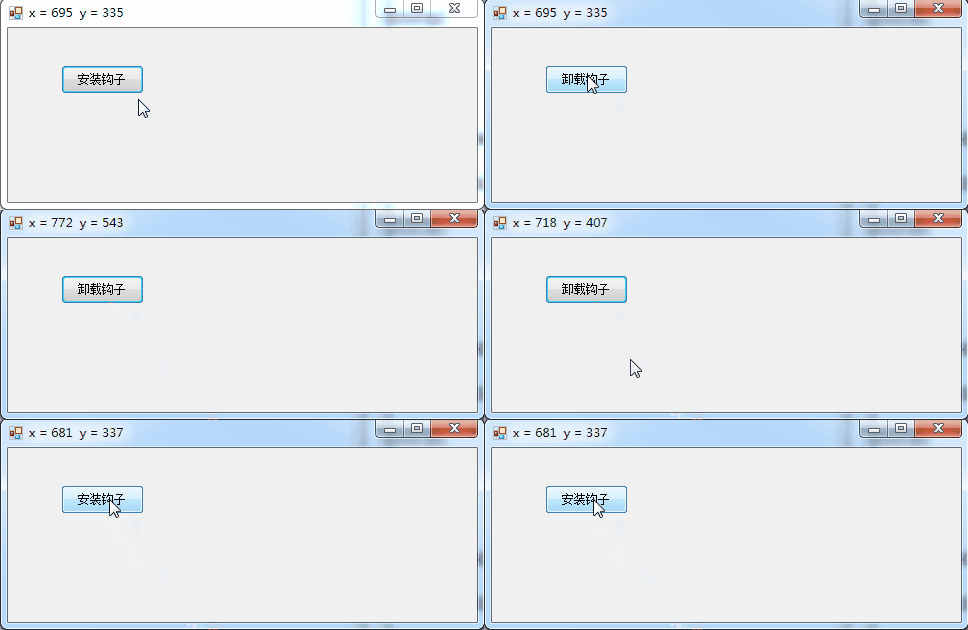
C#实现的鼠标钩子,可以获取鼠标在屏幕中的坐标,记得要以管理员权限运行才行
using System;
using System.Collections.Generic;
using System.ComponentModel;
using System.Data;
using System.Drawing;
using System.Linq;
using System.Reflection;
using System.Runtime.InteropServices;
using System.Text;
using System.Windows.Forms;
namespace app01
{
public partial class Form1 : Form
{
public delegate int HookProc(int nCode, IntPtr wParam, IntPtr lParam);
//定义钩子句柄
public static int hHook = 0;
//定义钩子类型
public const int WH_MOUSE_LL = 14;
public HookProc MyProcedure;
//安装钩子
[DllImport("user32.dll", CharSet = CharSet.Auto, CallingConvention = CallingConvention.StdCall)]
public static extern int SetWindowsHookEx(int idHook, HookProc lpfn, IntPtr hInstance, int threadId);
//卸载钩子
[DllImport("user32.dll", CharSet = CharSet.Auto, CallingConvention = CallingConvention.StdCall)]
public static extern bool UnhookWindowsHookEx(int idHook);
//调用下一个钩子
[DllImport("user32.dll", CharSet = CharSet.Auto, CallingConvention = CallingConvention.StdCall)]
public static extern int CallNextHookEx(int idHook, int nCode, IntPtr wParam, IntPtr lParam);
[StructLayout(LayoutKind.Sequential)]
public class POINT
{
public int x;
public int y;
}
[StructLayout(LayoutKind.Sequential)]
public class MouseHookStruct
{
public POINT pt;
public int hwnd;
public int wHitTestCode;
public int dwExtraInfo;
}
public Form1()
{
InitializeComponent();
}
private void button1_Click(object sender, EventArgs e)
{
if (hHook == 0)
{
MyProcedure = new HookProc(this.MouseHookProc);
//这里挂节钩子
hHook = SetWindowsHookEx(WH_MOUSE_LL, MyProcedure, Marshal.GetHINSTANCE(Assembly.GetExecutingAssembly().GetModules()[0]), 0);
if (hHook == 0)
{
MessageBox.Show("SetWindowsHookEx Failed");
return;
}
button1.Text = "卸载钩子";
}
else
{
bool ret = UnhookWindowsHookEx(hHook);
if (ret == false)
{
MessageBox.Show("UnhookWindowsHookEx Failed");
return;
}
hHook = 0;
button1.Text = "安装钩子";
}
}
public int MouseHookProc(int nCode, IntPtr wParam, IntPtr lParam)
{
MouseHookStruct MyMouseHookStruct = (MouseHookStruct)Marshal.PtrToStructure(lParam, typeof(MouseHookStruct));
if (nCode < 0)
{
return CallNextHookEx(hHook, nCode, wParam, lParam);
}
else
{
String strCaption = "x = " + MyMouseHookStruct.pt.x.ToString("d") + " y = " + MyMouseHookStruct.pt.y.ToString("d");
this.Text = strCaption;
return CallNextHookEx(hHook, nCode, wParam, lParam);
}
}
}
}
演示:
以上就是本文所述的全部内容了,希望大家能够喜欢。


