c#数据绑定之数据转化为信息的示例

所属分类: 软件编程 / C#教程 阅读数: 100
收藏 0 赞 0 分享

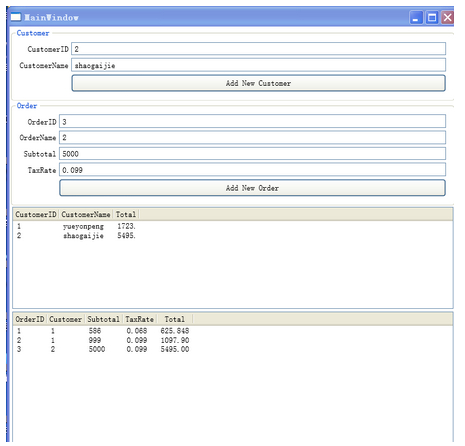
目标界面:

XAML代码:

复制代码 代码如下:

<Grid Margin="2">
            <Grid.RowDefinitions>
                <RowDefinition  Height="Auto"/>
                <RowDefinition  Height="Auto"/>
                <RowDefinition  Height="Auto"/>
                <RowDefinition />
            </Grid.RowDefinitions>
            <GroupBox Header="Customer" Grid.Row="0" Padding="5">
                <Grid>
                    <Grid.RowDefinitions>
                        <RowDefinition />
                        <RowDefinition />
                        <RowDefinition/>
                    </Grid.RowDefinitions>
                    <Grid.ColumnDefinitions>
                        <ColumnDefinition Width="Auto"/>
                        <ColumnDefinition/>
                    </Grid.ColumnDefinitions>
                    <TextBlock Grid.Row="0" Grid.Column="0" Text="CustomerID" Margin="2" HorizontalAlignment="Right" VerticalAlignment="Center"/>
                    <TextBox Grid.Row="0" Grid.Column="1" Margin="2" Name="tbxCustomerID" Text="{Binding Path=CID}"/>
                    <TextBlock Grid.Row="1" Grid.Column="0" Text="CustomerName" Margin="2" HorizontalAlignment="Right" VerticalAlignment="Center"/>
                    <TextBox Grid.Row="1" Grid.Column="1" Margin="2" Name="tbxCustomerName" Text="{Binding Path=Name}"/>
                    <Button Grid.Row="2" Grid.Column="1" Content="Add New Customer" Margin="2" Name="btnAddCustomer" Padding="2" Click="btnAddCustomer_Click" />
                </Grid>
            </GroupBox>
            <GroupBox Header="Order" Grid.Row="1" Padding="5">
                <Grid>
                    <Grid.RowDefinitions>
                        <RowDefinition />
                        <RowDefinition />
                        <RowDefinition />
                        <RowDefinition />
                        <RowDefinition />
                    </Grid.RowDefinitions>
                    <Grid.ColumnDefinitions>
                        <ColumnDefinition Width="Auto"/>
                        <ColumnDefinition/>
                    </Grid.ColumnDefinitions>
                    <TextBlock Grid.Row="0" Grid.Column="0" Text="OrderID" Margin="2" HorizontalAlignment="Right" VerticalAlignment="Center"/>
                    <TextBox Grid.Row="0" Grid.Column="1" Margin="2" Name="tbxOrderID" Text="{Binding Path=OID}"/>
                    <TextBlock Grid.Row="1" Grid.Column="0" Text="OrderName" Margin="2" HorizontalAlignment="Right" VerticalAlignment="Center"/>
                    <TextBox Grid.Row="1" Grid.Column="1" Margin="2" Name="tbxOrderName" Text="{Binding Path=Customer}"/>
                    <TextBlock Grid.Row="2" Grid.Column="0" Text="Subtotal" Margin="2" HorizontalAlignment="Right" VerticalAlignment="Center"/>
                    <TextBox Grid.Row="2" Grid.Column="1" Margin="2" Name="tbxSubtotal" Text="{Binding Path=Subtotal}"/>
                    <TextBlock Grid.Row="3" Grid.Column="0" Text="TaxRate" Margin="2" HorizontalAlignment="Right" VerticalAlignment="Center"/>
                    <TextBox Grid.Row="3" Grid.Column="1" Margin="2" Name="tbxTaxRate" Text="{Binding Path=TaxRate}"/>
                    <Button Grid.Row="4" Grid.Column="1" Content="Add New Order" Margin="2" Name="btnAddOrder" Padding="2" Click="btnAddOrder_Click" />
                </Grid>
            </GroupBox>
            <ListView Name="lstDisplayCustomer" ItemsSource="{Binding}" Grid.Row="2"  Margin="2" MinHeight="150">
                <ListView.View>
                    <GridView>
                        <GridView.Columns>
                            <GridViewColumn  Header="CustomerID" DisplayMemberBinding="{Binding CID}"/>
                            <GridViewColumn Header="CustomerName" DisplayMemberBinding="{Binding Name}"/>
                            <GridViewColumn Header="Total" DisplayMemberBinding="{Binding OrderTotals}" />
                        </GridView.Columns>
                    </GridView>
                </ListView.View>
            </ListView>
            <ListView Name="lstDisplayOrder" ItemsSource="{Binding}" Grid.Row="3"  Margin="2" MinHeight="150">
                <ListView.View>
                    <GridView>
                        <GridView.Columns>
                            <GridViewColumn  Header="OrderID" DisplayMemberBinding="{Binding OID}"/>
                            <GridViewColumn Header="Customer" DisplayMemberBinding="{Binding Customer}"/>
                            <GridViewColumn Header="Subtotal" DisplayMemberBinding="{Binding Subtotal}"/>
                            <GridViewColumn Header="TaxRate"  DisplayMemberBinding="{Binding TaxRate}" />
                            <GridViewColumn Header="Total"    DisplayMemberBinding="{Binding Total}"/>
                        </GridView.Columns>
                    </GridView>
                </ListView.View>
            </ListView>
        </Grid>

C# 代码:

复制代码 代码如下:

DataSet business = NewData();

        public MainWindow()
        {
            InitializeComponent();

        }

        private static DataSet NewData()
        {
            //-----build the parent table and add some data
            DataTable customer = new DataTable("Customer");
            customer.Columns.Add("CID", typeof(Int32));
            customer.Columns.Add("Name", typeof(string));
            //-------build the child table and add some data.
            DataTable orders = new DataTable("Order");
            orders.Columns.Add("OID", typeof(int));
            orders.Columns.Add("Customer", typeof(Int32));
            orders.Columns.Add("Subtotal", typeof(decimal));
            orders.Columns.Add("TaxRate", typeof(decimal));
            orders.Columns.Add("Total",typeof(decimal),"Subtotal*(1+TaxRate)");

            //-----Link the table within a Dataset.
            DataSet business = new DataSet();
            business.Tables.Add(customer);
            business.Tables.Add(orders);
            business.Relations.Add(customer.Columns["CID"],orders.Columns["Customer"]);
            customer.Columns.Add("OrderTotals" ,typeof(decimal),"Sum(Child.Total)");
            return business;
        }

        private void btnAddCustomer_Click(object sender, RoutedEventArgs e)
        {
           //Vist datatable customer.
            DataTable customer=business.Tables["Customer"];
            NewMember(customer);
            lstDisplayCustomer.DataContext = customer;
        }

        private DataTable NewMember(DataTable table)
        {
            DataRow newRow = table.NewRow();
            newRow["CID"] = tbxCustomerID.Text;
            newRow["Name"] = tbxCustomerName.Text;
            table.Rows.Add(newRow);
            return table;
        }

        private DataTable NewMemberOrder(DataTable table)
        {
            DataRow newRow = table.NewRow();
            newRow["OID"] = tbxOrderID.Text;
            newRow["Customer"] = tbxOrderName.Text;
            newRow["Subtotal"] = tbxSubtotal.Text;
            newRow["TaxRate"] = tbxTaxRate.Text;
            table.Rows.Add(newRow);
            return table;
        }

        private void btnAddOrder_Click(object sender, RoutedEventArgs e)
        {
            //Vist datatable order.
            DataTable order = business.Tables["Order"];
            NewMemberOrder(order);
            lstDisplayOrder.DataContext = order;
        }

更多精彩内容其他人还在看

c#开发word批量转pdf源码分享

已经安装有Office环境,借助一些简单的代码即可实现批量Word转PDF,看下面的实例源码吧
收藏 0 赞 0 分享

c# xml API操作的小例子

这篇文章主要介绍了c# xml API操作的小例子,有需要的朋友可以参考一下
收藏 0 赞 0 分享

c#唯一值渲染实例代码

这篇文章主要介绍了c#唯一值渲染实例代码,有需要的朋友可以参考一下
收藏 0 赞 0 分享

淘宝IP地址库采集器c#代码

这篇文章主要介绍了淘宝IP地址库采集器c#代码,有需要的朋友可以参考一下
收藏 0 赞 0 分享

C#在后台运行操作(BackgroundWorker用法)示例分享

BackgroundWorker类允许在单独的专用线程上运行操作。如果需要能进行响应的用户界面,而且面临与这类操作相关的长时间延迟,则可以使用BackgroundWorker类方便地解决问题,下面看示例
收藏 0 赞 0 分享

c#文本加密程序代码示例

这是一个加密软件,但只限于文本加密,加了窗口控件的滑动效果,详细看下面的代码
收藏 0 赞 0 分享

c#生成站点地图(SiteMapPath)文件示例程序

这篇文章主要介绍了c#生成站点地图(SiteMapPath)文件的示例,大家参考使用
收藏 0 赞 0 分享

C# 键盘Enter键取代Tab键实现代码

这篇文章主要介绍了C# 键盘Enter键取代Tab键实现代码,有需要的朋友可以参考一下
收藏 0 赞 0 分享

C# WinForm导出Excel方法介绍

在.NET应用中,导出Excel是很常见的需求,导出Excel报表大致有以下三种方式:Office PIA,文件流和NPOI开源库,本文只介绍前两种方式
收藏 0 赞 0 分享

C#串口通信程序实例详解

在.NET平台下创建C#串口通信程序,.NET 2.0提供了串口通信的功能,其命名空间是System.IO.Ports,创建C#串口通信程序的具体实现是如何的呢?让我们开始吧
收藏 0 赞 0 分享
查看更多