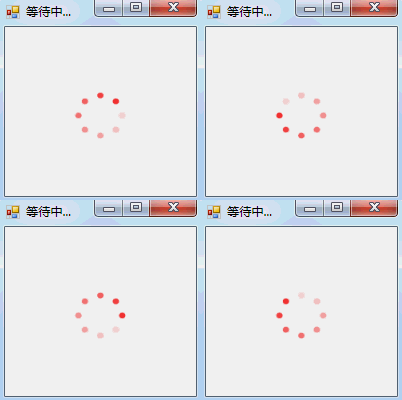
之前写了一个WPF的圆形环绕的Loading动画,现在写一个Winform的圆形环绕的Loading动画。
1.新建Winform项目,添加一个pictureBox控件,命名为:pictureBox;
2.引用中添加using System.Drawing.Drawing2D;
3.Form窗体命名为:Loading,cs全部代码如下:
namespace Circle_ProcessBar
{
public partial class Loading : Form
{
private int count = -1;
private ArrayList images = new ArrayList();
public Bitmap[] bitmap = new Bitmap[8];
private int _value = 1;
private Color _circleColor = Color.Red;
private float _circleSize = 0.8f;
public Loading()
{
InitializeComponent();
}
public Color CircleColor
{
get { return _circleColor; }
set
{
_circleColor = value;
Invalidate();
}
}
public float CircleSize
{
get { return _circleSize; }
set
{
if (value <= 0.0F)
_circleSize = 0.05F;
else
_circleSize = value > 4.0F ? 4.0F : value;
Invalidate();
}
}
public Bitmap DrawCircle(int j)
{
const float angle = 360.0F / 8; Bitmap map = new Bitmap(150, 150);
Graphics g = Graphics.FromImage(map);
g.TranslateTransform(Width / 2.0F, Height / 2.0F);
g.RotateTransform(angle * _value);
g.InterpolationMode = InterpolationMode.HighQualityBicubic;
g.SmoothingMode = SmoothingMode.AntiAlias;
int[] a = new int[8] { 25, 50, 75, 100, 125, 150, 175, 200 };
for (int i = 1; i <= 8; i++)
{
int alpha = a[(i + j - 1) % 8];
Color drawColor = Color.FromArgb(alpha, _circleColor);
using (SolidBrush brush = new SolidBrush(drawColor))
{
float sizeRate = 3.5F / _circleSize;
float size = Width / (6 * sizeRate);
float diff = (Width / 10.0F) - size;
float x = (Width / 80.0F) + diff;
float y = (Height / 80.0F) + diff;
g.FillEllipse(brush, x, y, size, size);
g.RotateTransform(angle);
}
}
return map;
}
public void Draw()
{
for (int j = 0; j < 8; j++)
{
bitmap[7-j] = DrawCircle(j);
}
}
protected override void OnResize(EventArgs e)
{
SetNewSize();
base.OnResize(e);
}
protected override void OnSizeChanged(EventArgs e)
{
SetNewSize();
base.OnSizeChanged(e);
}
private void SetNewSize()
{
int size = Math.Max(Width, Height);
Size = new Size(size, size);
}
public void set()
{
for (int i = 0; i < 8; i++)
{
Draw();
Bitmap map = new Bitmap((bitmap[i]), new Size(120, 110));
images.Add(map);
}
pictureBox.Image = (Image)images[0];
pictureBox.Size = pictureBox.Image.Size;
}
private void pictureBox_Click(object sender, EventArgs e)
{
this.Visible = false;
base.Dispose();
}
private void Timer_Tick(object sender, EventArgs e)
{
set();
count = (count + 1) % 8;
pictureBox.Image = (Image)images[count];
}
private void button1_Click(object sender, EventArgs e)
{
this.Visible = false;
base.Dispose();
}
}
}