1. foreach语句
C#编译器会把foreach语句转换为IEnumerable接口的方法和属性。
foreach (Person p in persons)
{
Console.WriteLine(p);
}
foreach语句会解析为下面的代码段。
•调用GetEnumerator()方法,获得数组的一个枚举
•在while循环中,只要MoveNext()返回true,就一直循环下去
•用Current属性访问数组中的元素
IEnumerator enumerator = persons. GetEnumerator();
while (enumerator.MoveNext())
{
Person p = (Person) enumerator.Current;
Console.WriteLine(p);
}
2. yield语句
•yield语句的两种形式:
yield return <expression>;
yield break;
•使用一个yield return语句返回集合的一个元素
•包含yield语句的方法或属性是迭代器。迭代器必须满足以下要求
a. 返回类型必须是IEnumerable、IEnumerable<T>、IEnumerator或 IEnumerator<T>。
b. 它不能有任何ref或out参数
•yield return语句不能位于try-catch快。yield return语句可以位于try-finally的try块
try
{
// ERROR: Cannot yield a value in the boday of a try block with a catch clause
yield return "test";
}
catch
{ }
try
{
//
yield return "test again";
}
finally
{ }
try
{ }
finally
{
// ERROR: Cannot yield in the body of a finally clause
yield return "";
}
yield break语句可以位于try块或catch块,但是不能位于finally块
下面的例子是用yield return语句实现一个简单集合的代码,以及用foreach语句迭代集合
using System;
using System.Collections.Generic;
namespace ConsoleApplication6
{
class Program
{
static void Main(string[] args)
{
HelloCollection helloCollection = new HelloCollection();
foreach (string s in helloCollection)
{
Console.WriteLine(s);
Console.ReadLine();
}
}
}
public class HelloCollection
{
public IEnumerator<String> GetEnumerator()
{
// yield return语句返回集合的一个元素,并移动到下一个元素上;yield break可以停止迭代
yield return "Hello";
yield return "World";
}
}
}
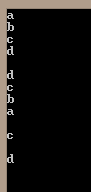
使用yield return语句实现以不同方式迭代集合的类:
using System;
using System.Collections.Generic;
namespace ConsoleApplication8
{
class Program
{
static void Main(string[] args)
{
MusicTitles titles = new MusicTitles();
foreach (string title in titles)
{
Console.WriteLine(title);
}
Console.WriteLine();
foreach (string title in titles.Reverse())
{
Console.WriteLine(title);
}
Console.WriteLine();
foreach (string title in titles.Subset(2, 2))
{
Console.WriteLine(title);
Console.ReadLine();
}
}
}
public class MusicTitles
{
string[] names = { "a", "b", "c", "d" };
public IEnumerator<string> GetEnumerator()
{
for (int i = 0; i < 4; i++)
{
yield return names[i];
}
}
public IEnumerable<string> Reverse()
{
for (int i = 3; i >= 0; i--)
{
yield return names[i];
}
}
public IEnumerable<string> Subset(int index, int length)
{
for (int i = index; i < index + length; i++)
{
yield return names[i];
}
}
}
}
输出: