下面是运行的效果图
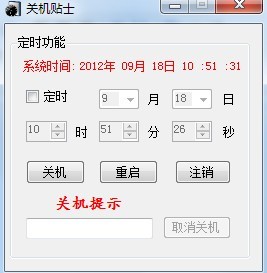 核心代码:
核心代码:
using System;
using System.Collections.Generic;
using System.ComponentModel;
using System.Data;
using System.Drawing;
using System.Linq;
using System.Text;
using System.Windows.Forms;
/*
*
* 整理:张晓天
* Q Q:977602650
* 日期:2012-03-29
*
*/
namespace ExitComputer
{
public partial class Form1 : Form
{
int goTime = 0;//程序运行时间
string cmd = null;//写入shutdown的命令
int countTime = 0;//到程序执行的时间
public Form1()
{
InitializeComponent();
}
/// <summary>
/// 窗体加载事件
/// </summary>
/// <param name="sender"></param>
/// <param name="e"></param>
private void Form1_Load(object sender, EventArgs e)
{
nfiPic.Icon = this.Icon;//指定系统的图标
label1.Text = DateTime.Now.ToString("yyyy年 MM月 dd日 HH :mm :ss");//系统时间
nudHour.Maximum = 23;
nudMinutes.Maximum = 59;
nudSecond.Maximum = 59;//指定控件的最大值
cboMonth.Text = DateTime.Now.Month.ToString();
cboDay.Text = DateTime.Now.Day.ToString();
nudHour.Value = DateTime.Now.Hour;
nudMinutes.Value = DateTime.Now.Minute;
nudSecond.Value = DateTime.Now.Second;//指定控件的值
//指定时间控件发生的频率
tmrTime.Interval = 1000;
tmrTime.Enabled = true;
//为月和日赋值
for (int i = 1; i < 13; i++)
{
cboMonth.Items.Add(i);
}
for (int i = 1; i < 32; i++)
{
cboDay.Items.Add(i);
}
//指定不可用的控件
cboMonth.Enabled = false;
cboDay.Enabled = false;
nudHour.Enabled = false;
nudMinutes.Enabled = false;
nudSecond.Enabled = false;
btnExit.Enabled = false;
}
//定时的属性改写时事件
private void chkTiming_CheckedChanged(object sender, EventArgs e)
{
if (chkTiming.Checked == true)
{
cboMonth.Enabled = true;
cboDay.Enabled = true;
nudHour.Enabled = true;
nudMinutes.Enabled = true;
nudSecond.Enabled = true;
}
else
{
cboMonth.Enabled = false;
cboDay.Enabled = false;
nudHour.Enabled = false;
nudMinutes.Enabled = false;
nudSecond.Enabled = false;
}
}
/// <summary>
/// 显示窗体
/// </summary>
private void windowShow()
{
this.Show();
this.ShowInTaskbar = true;
this.WindowState = FormWindowState.Normal;
}
//重写事件实现气泡提示
protected override void OnSizeChanged(EventArgs e)
{
base.OnSizeChanged(e);
if (WindowState == FormWindowState.Minimized)
{
nfiPic.ShowBalloonTip(30);
}
}
/// <summary>
/// 隐藏托盘
/// </summary>
private void windowHide()
{
this.Hide();
this.ShowInTaskbar = false;
nfiPic.Visible = true;
nfiPic.ShowBalloonTip(30);
}
//最小化窗体时的事件
private void Form1_Resize(object sender, EventArgs e)
{
if (this.WindowState == FormWindowState.Minimized)
this.windowHide();
}
//鼠标双击托盘图标时的事件
private void nfiPic_MouseDoubleClick(object sender, MouseEventArgs e)
{
this.windowShow();
}
//保证选择的月份是正确的
private void cboMonth_TextChanged(object sender, EventArgs e)
{
try
{
int temp1 = int.Parse(cboMonth.Text);
int temp = int.Parse(cboDay.Text);
if (temp1 < 1 || temp1 > 12)
{
cboMonth.Text = DateTime.Now.Month.ToString();
}
if (cboMonth.Text == "2")
{
if (DateTime.IsLeapYear(DateTime.Now.Year) == true)//判断今年是否为闰年
{
if (temp > 28)
{
cboDay.Text = DateTime.Now.Day.ToString();
}
}
else if (temp > 29)
{
cboDay.Text = DateTime.Now.Day.ToString();
}
}
else if (cboMonth.Text == "4" || cboMonth.Text == "6" || cboMonth.Text == "9" || cboMonth.Text == "11")
{
if (temp > 30)
{
cboDay.Text = DateTime.Now.Day.ToString();
}
}
}
catch (Exception)
{
cboMonth.Text = DateTime.Now.Month.ToString();
}
}
//保证选择的天数是正确的
private void cboDay_TextChanged(object sender, EventArgs e)
{
try
{
int temp = int.Parse(cboDay.Text);
if (temp < 1 || temp > 31)
{
cboDay.Text = DateTime.Now.Day.ToString();
}
//判断月份
if (cboMonth.Text == "2")
{
if (DateTime.IsLeapYear(DateTime.Now.Year) == true)//判断今年是否为闰年
{
if (temp > 28)
{
cboDay.Text = DateTime.Now.Day.ToString();
}
}
else if (temp > 29)
{
cboDay.Text = DateTime.Now.Day.ToString();
}
}
else if (cboMonth.Text == "4" || cboMonth.Text == "6" || cboMonth.Text == "9" || cboMonth.Text == "11")
{
if (temp > 30)
{
cboDay.Text = DateTime.Now.Day.ToString();
}
}
}
catch (Exception)
{
cboDay.Text = DateTime.Now.Day.ToString();
}
}
//程序执行时给CountTime赋的值
private bool timeControl()
{
if (chkTiming.Checked == true)
{
DateTime startTime = Convert.ToDateTime(DateTime.Now.Year.ToString() + "/" + cboMonth.Text + "/" +
cboDay.Text + " " + nudHour.Value.ToString() + ":" + nudMinutes.Value.ToString() + ":" + nudSecond.Value.ToString());
TimeSpan endtime = startTime - DateTime.Now;
countTime = endtime.Days * 86400 + endtime.Hours * 3600 + endtime.Minutes * 60 + endtime.Seconds;
}
if (countTime < 0)
{
MessageBox.Show("对不起!您选择的时间有误!", "操作提示", MessageBoxButtons.OK, MessageBoxIcon.Information);
//让窗体回到初始化时的状态
chkTiming.Enabled = true;
btnLogout.Enabled = true;
btnOver.Enabled = true;
btnAgain.Enabled = true;
btnExit.Enabled = false;
tmrTime.Enabled = false;
return false;
}
tmrTime.Enabled = true;
return true;
}
//时间控件每次发生的事件
private void tmrTime_Tick(object sender, EventArgs e)
{
label1.Text = DateTime.Now.ToString("yyyy年 MM月 dd日 HH :mm :ss");
if (cmd != null)
{
goTime += 1;
if (countTime - goTime + 5 < 0)
{
txtRemind.Text = "0";
cmd = null;
}
else
{
//在提示文本中显示的内容
int temp = countTime - goTime + 1;
txtRemind.Text = temp / 86400 + "天 " + temp % 86400 / 3600 + "时 " + temp % 3600 / 60 + "分 " + temp % 60 + "秒 ";
if (countTime - goTime + 1 == 0) //判断时间是否到了
{
System.Diagnostics.ProcessStartInfo p1 = new System.Diagnostics.ProcessStartInfo("shutdown.exe", cmd);
p1.WindowStyle = System.Diagnostics.ProcessWindowStyle.Hidden;
System.Diagnostics.Process.Start(p1);
Application.ExitThread();
Application.Exit();//程序结束
}
}
}
}
/// <summary>
/// 定时关机事件
/// </summary>
/// <param name="sender"></param>
/// <param name="e"></param>
private void btnOver_Click(object sender, EventArgs e)
{
if (!timeControl()) return;
cmd = "-s -t 0";
lblRemind.Text = "剩余时间";
chkTiming.Checked = false;
chkTiming.Enabled = false;
btnExit.Enabled = true;
Allow();
}
/// <summary>
/// 重启事件
/// </summary>
/// <param name="sender"></param>
/// <param name="e"></param>
private void btnAgain_Click(object sender, EventArgs e)
{
if (!timeControl()) return;
cmd = "-r -t 0";
lblRemind.Text = "剩余时间";
chkTiming.Checked = false;
chkTiming.Enabled = false;
btnExit.Enabled = true;
Allow();
}
private void btnLogout_Click(object sender, EventArgs e)
{
if (!timeControl()) return;
cmd = "-l";
lblRemind.Text = "剩余时间";
chkTiming.Checked = false;
chkTiming.Enabled = false;
btnExit.Enabled = true;
Allow();
}
private void tsmiShow_Click(object sender, EventArgs e)
{
this.windowShow();
}
private void tsmiExit_Click(object sender, EventArgs e)
{
this.Dispose();
}
/// <summary>
/// 单击取消发生的事件
/// </summary>
/// <param name="sender"></param>
/// <param name="e"></param>
private void btnExit_Click(object sender, EventArgs e)
{
btnLogout.Enabled = true;
btnOver.Enabled = true;
btnAgain.Enabled = true;
btnExit.Enabled = false;
cmd = null;
goTime = 0;
countTime = 0;
txtRemind.Text = "0";
lblRemind.Text = "关机提示";
chkTiming.Enabled = true;
MessageBox.Show("任务已被成功取消", "操作提示", MessageBoxButtons.OK, MessageBoxIcon.Information);
}
/// <summary>
/// 提醒事件
/// </summary>
public void Allow()
{
DialogResult result;
result = MessageBox.Show("程序将自动最小化到托盘", "操作提示", MessageBoxButtons.YesNo, MessageBoxIcon.Information);
if (result == DialogResult.Yes)
{
this.windowHide();
}
}
}
}
源码打包下载


