

ASP.NET MVC中Bundle是用于打包捆绑资源的(一般是css和js),它是在全局文件Global.asax.cs中注册Bundle,而注册的具体实现默认是在App_Start文件夹的BundleConfig.cs中
public class MvcApplication : System.Web.HttpApplication
{
 protected void Application_Start()
 {
  AreaRegistration.RegisterAllAreas();
  FilterConfig.RegisterGlobalFilters(GlobalFilters.Filters);
  RouteConfig.RegisterRoutes(RouteTable.Routes);
  BundleConfig.RegisterBundles(BundleTable.Bundles);
 }
}
BundleConfig.RegisterBundles(BundleTable.Bundles); 在应用程序启用时注册Bundle
public class BundleConfig
{
 // 有关绑定的详细信息,请访问 http://go.microsoft.com/fwlink/?LinkId=301862
 public static void RegisterBundles(BundleCollection bundles)
 {
  bundles.Add(new ScriptBundle("~/bundles/jquery").Include(
     "~/Scripts/jquery-{version}.js"));

  bundles.Add(new ScriptBundle("~/bundles/jqueryval").Include(
     "~/Scripts/jquery.validate*"));

  // 使用要用于开发和学习的 Modernizr 的开发版本。然后,当你做好
  // 生产准备时,请使用 http://modernizr.com 上的生成工具来仅选择所需的测试。
  bundles.Add(new ScriptBundle("~/bundles/modernizr").Include(
     "~/Scripts/modernizr-*"));

  bundles.Add(new ScriptBundle("~/bundles/bootstrap").Include(
     "~/Scripts/bootstrap.js",
     "~/Scripts/respond.js"));

  bundles.Add(new StyleBundle("~/Content/css").Include(
     "~/Content/bootstrap.css",
     "~/Content/site.css"));
 }
}
为了便于说明,这里在HomeController下新建一个Action,如下:
public ActionResult BundleTest()
{
 return View();
}
这里以使用Bootstrap为例,在视图中使用@Styles.Render() 和@Scripts.Render() 引入css和js,参数是在BundleConfig注册的名称
@{
 Layout = null;
}
<!DOCTYPE html>
<html>
<head>
 <meta name="viewport" content="width=device-width" />
 <title>BundleTest</title>
 @Styles.Render("~/Content/css")
</head>
<body>

 @Scripts.Render("~/bundles/jquery", "~/bundles/bootstrap")
</body>
</html>
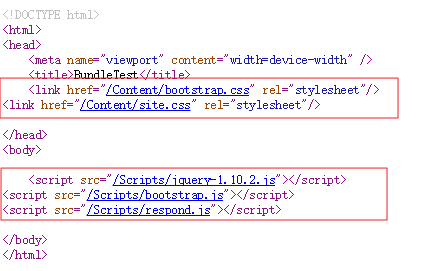
浏览页面,查看源代码,可以看到:
bundles.Add(new StyleBundle("~/Content/css").Include(
      "~/Content/bootstrap.css",
      "~/Content/site.css"));
由于在BundleConfig.cs中注册上面的Bundle,@Styles.Render("~/Content/css")渲染时是引入~/Content/bootstrap.css和~/Content/site.css,js的渲染同理
为了验证是否真正引入了BootStrap的css与js资源,这里添加了一些简单的BootStrap示例代码,如下:
@{
Layout = null;
}
<!DOCTYPE html>
<html>
<head>
<meta name="viewport" content="width=device-width" />
<title>BundleTest</title>
@Styles.Render("~/Content/css")
</head>
<body>
<div class="container">
<div class="header clearfix">
<nav>
<ul class="nav nav-pills pull-right">
<li role="presentation" class="active"><a href="#">首页</a></li>
<li role="presentation"><a href="#">关于我们</a></li>
<li role="presentation"><a href="#">联系我们</a></li>
</ul>
</nav>
</div>
<form class="form-horizontal">
<div class="form-group">
<label for="username" class="col-sm-2 control-label">用户名</label>
<div class="col-sm-10">
<input type="text" class="form-control" id="username" placeholder="用户名">
</div>
</div>
<div class="form-group">
<label for="password" class="col-sm-2 control-label">密码</label>
<div class="col-sm-10">
<input type="password" class="form-control" id="password" placeholder="密码">
</div>
</div>
<div class="form-group">
<label for="code" class="col-sm-2 control-label">验证码</label>
<div class="col-sm-10">
<input type="text" class="form-control" id="code" placeholder="验证码">
</div>
</div>
<div class="form-group">
<div class="col-sm-offset-2 col-sm-10">
<div class="checkbox">
<label>
<input type="checkbox"> 记住我
</label>
</div>
</div>
</div>
<div class="form-group">
<div class="col-sm-offset-2 col-sm-10">
<button type="submit" class="btn btn-default">登录</button>
</div>
</div>
</form>
<footer class="footer">
<p>© 2017 Zhong.</p>
</footer>
</div> <!-- /container -->
@Scripts.Render("~/bundles/jquery", "~/bundles/bootstrap")
</body>
</html>
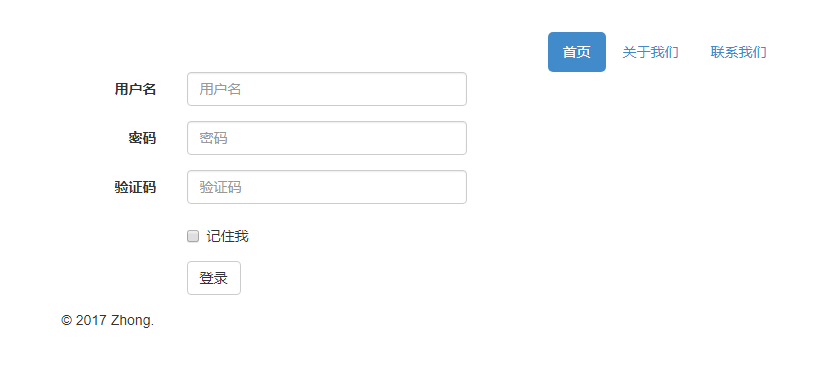
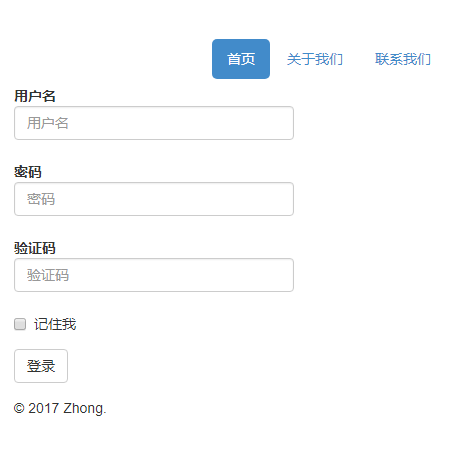
前台浏览看效果(当浏览器足够大时是横向平铺的,如果将浏览器缩小,则是垂直平铺,示例中的表单部分最能体现出来):
改进
上面的Bundle是引入了未压缩的css和js资源,但在实际应用中,出于为了减轻服务器负载等原因,需要引入压缩版的资源(一般是在未压缩的命名后面加上min来命名,如jquery.js的压缩版【有些叫法是精简版】是jquery.min.js)
于是修改BundleConfig.cs
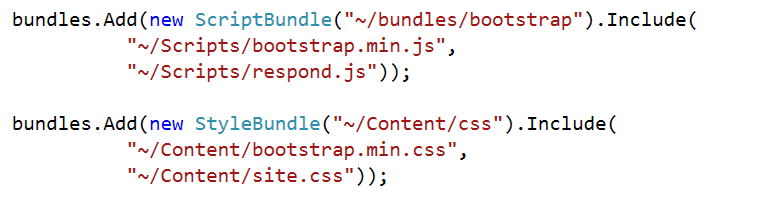
重新编译,再次浏览刚才的页面,这时发现引入了压缩版的资源(css/js)
注:由于示例时使用了ASP.NET MVC 5( .Net Framework 4.5),而在.net framework 4中的asp.net mvc 4可能会有下面的情况:
在页面查看源代码时发现脚本缺少引入~/Scripts/bootstrap.min.js,这是asp.net mvc 4使用的System.Web.Optimization.dll默认使用了忽略规则*.min.js,这时可以在BundleConfig.cs的RegisterBundles中清除忽略规则
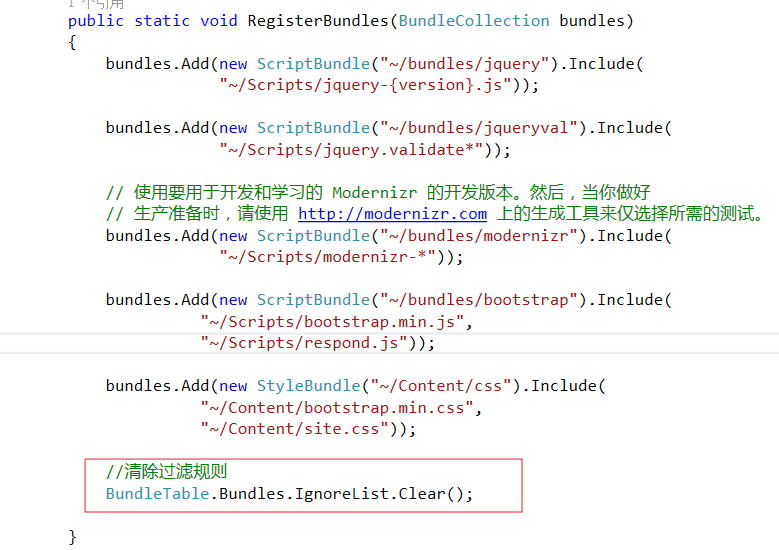
该解决方法一是通过反编译System.Web.Optimization.dll并结合反编译的代码得出来的,另外也可以参考这个链接
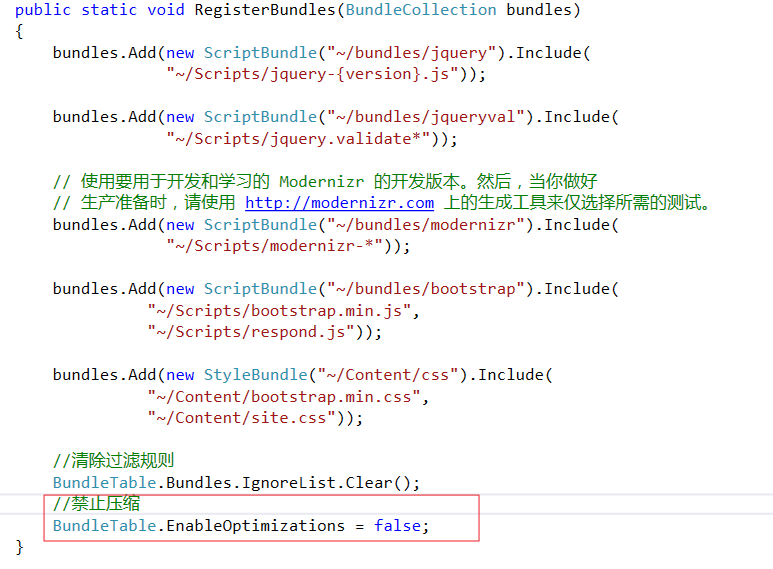
另外就是在部署生产环境时发现无效,因为生产环境不再是debug模式,此时需要设置:
以上就是本文的全部内容,希望对大家的学习有所帮助,也希望大家多多支持脚本之家。


