效果:
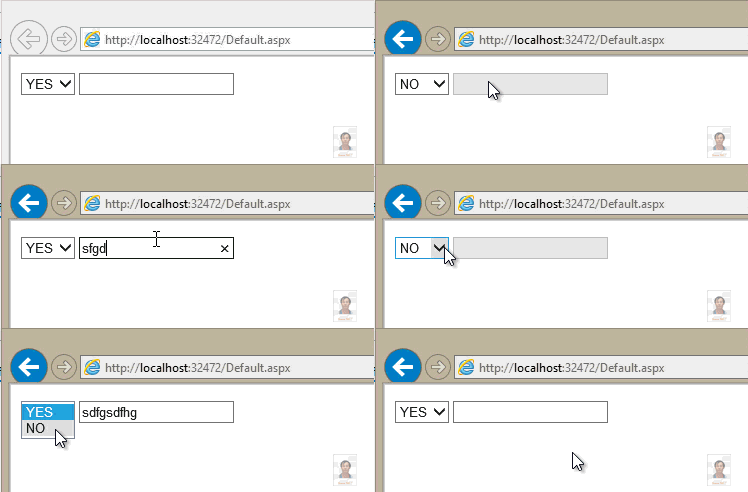
.aspx:
<%@ Page Language="C#" AutoEventWireup="true" CodeFile="Default.aspx.cs" Inherits="_Default" %>
<!DOCTYPE html>
<html xmlns="http://www.w3.org/1999/xhtml">
<head runat="server">
<title></title>
</head>
<body>
<form id="form1" runat="server">
<asp:DropDownList ID="DropDownListYesNo" runat="server" AutoPostBack="true" OnSelectedIndexChanged="DropDownList1_SelectedIndexChanged">
</asp:DropDownList>
<asp:TextBox ID="TextBox1" runat="server" Enabled="true"></asp:TextBox>
</form>
</body>
</html>
.aspx.cs:
using System;
using System.Collections.Generic;
using System.Data;
using System.Linq;
using System.Web;
using System.Web.UI;
using System.Web.UI.WebControls;
public partial class _Default : System.Web.UI.Page
{
protected void Page_Load(object sender, EventArgs e)
{
if (!IsPostBack)
{
Data_Binding();
}
}
private void Data_Binding()
{
this.DropDownListYesNo.DataSource = GetData().Select(yn => new { value = yn }).ToList();
this.DropDownListYesNo.DataTextField = "value";
this.DropDownListYesNo.DataBind();
}
protected void DropDownList1_SelectedIndexChanged(object sender, EventArgs e)
{
switch (this.DropDownListYesNo.SelectedItem.Text)
{
case "YES":
this.TextBox1.Enabled = true;
break;
case "NO":
this.TextBox1.Enabled = false;
this.TextBox1.Text = string.Empty;
break;
}
}
private List<string> GetData()
{
List<string> yn = new List<string>();
yn.Add("YES");
yn.Add("NO");
return yn;
}
}


