最近做的一个项目因为服务器是在特殊机房上的,因为安全方面的考虑,不能给我们开发者提供FTP服务,所以每次更新版本都得自己跑一趟,而他的机房有很远,所以我一直想能不能开发一个维护版本的系统呢,对数据库和代码进行在线更新,就不用自己跑了,于是就有了下面的尝试,在线恢复和备份SQL Server:
前台代码:
<%@ Page Language="C#" AutoEventWireup="true" CodeBehind="SqlDbMgmt.aspx.cs" Inherits="SysSourceMgmt.SqlDbMgmt" %>
<!DOCTYPE html PUBLIC "-//W3C//DTD XHTML 1.0 Transitional//EN" "http://www.w3.org/TR/xhtml1/DTD/xhtml1-transitional.dtd">
<html xmlns="http://www.w3.org/1999/xhtml">
<head runat="server">
<title></title>
</head>
<body>
<form id="form1" runat="server">
<div>
<table>
<tr>
<td style="width: 100px">
<span style="font-size: 9pt">操 作 数 据 库</span>
</td>
<td>
<asp:DropDownList ID="DropDownList1" runat="server" Font-Size="9pt" Width="124px">
</asp:DropDownList>
<asp:TextBox ID="txtDbName" runat="server"></asp:TextBox>
</td>
<td style="width: 100px">
</td>
</tr>
<tr>
<td style="width: 100px">
<span style="font-size: 9pt">备份名称和位置</span>
</td>
<td style="width: 100px">
<asp:TextBox ID="TextBox1" runat="server" Font-Size="9pt" Width="117px"></asp:TextBox>
</td>
<td style="width: 100px">
<span style="font-size: 9pt; color: #ff3300">(如D:\beifen)</span>
</td>
</tr>
<tr>
<td colspan="3">
<asp:Button ID="Button1" runat="server" Font-Size="9pt" OnClick="Button1_Click" Text="备份数据库" />
</td>
</tr>
</table>
</div>
<div style="width: 100%; height: 100px">
<table>
<tr>
<td style="width: 100px; height: 21px">
<span style="font-size: 9pt">操 作 数 据 库</span>
</td>
<td>
<asp:DropDownList ID="DropDownList2" runat="server" Font-Size="9pt" Width="124px">
</asp:DropDownList>
</td>
<td style="width: 100px; height: 21px">
</td>
</tr>
<tr>
<td style="width: 100px">
<span style="font-size: 9pt">操 作 数 据 库</span>
</td>
<td style="width: 100px">
<asp:FileUpload ID="FileUpload1" runat="server" Font-Size="9pt" Width="190px" />
</td>
<td style="width: 100px">
</td>
</tr>
<tr>
<td colspan="3">
<asp:Button ID="Button2" runat="server" Font-Size="9pt" OnClick="Button2_Click" Text="还原数据库" />
<asp:Button ID="Button3" runat="server" Font-Size="9pt" OnClick="Button3_Click" Text="强制还原数据库" />
</td>
</tr>
</table>
</div>
</form>
</body>
</html>
后台:
using System;
using System.Collections.Generic;
using System.Linq;
using System.Web;
using System.Web.UI;
using System.Web.UI.WebControls;
using System.Data.SqlClient;
using System.IO;
using System.Data;
using System.Diagnostics;
namespace SysSourceMgmt
{
public partial class SqlDbMgmt : System.Web.UI.Page
{
protected void Page_Load(object sender, EventArgs e)
{
if (!IsPostBack)
{
try
{
string SqlStr1 = "Server=(local);DataBase=master;Uid=sa;Pwd=";
string SqlStr2 = "Exec sp_helpdb";
SqlConnection con = new SqlConnection(SqlStr1);
con.Open();
SqlCommand com = new SqlCommand(SqlStr2, con);
SqlDataReader dr = com.ExecuteReader();
this.DropDownList1.DataSource = dr;
this.DropDownList1.DataTextField = "name";
this.DropDownList1.DataBind();
dr.Close();
con.Close();
SqlStr1 = "Server=(local);DataBase=master;Uid=sa;Pwd=";
SqlStr2 = "Exec sp_helpdb";
con = new SqlConnection(SqlStr1);
con.Open();
com = new SqlCommand(SqlStr2, con);
dr = com.ExecuteReader();
this.DropDownList1.DataSource = dr;
this.DropDownList1.DataTextField = "name";
this.DropDownList1.DataBind();
dr.Close();
con.Close();
}
catch (Exception)
{
}
}
}
protected void Button1_Click(object sender, EventArgs e)
{
string dbName = string.Empty;
if (DropDownList1.Items.Count != 0)
{
dbName = DropDownList1.SelectedValue.Trim();
}
else
{
dbName = txtDbName.Text.Trim();
}
string SqlStr1 = "Data Source=.\\sqlexpress;Initial Catalog='" + dbName + "';Integrated Security=True";
string SqlStr2 = "backup database " + dbName + " to disk='" + this.TextBox1.Text.Trim() + ".bak'";
SqlConnection con = new SqlConnection(SqlStr1);
con.Open();
try
{
if (File.Exists(this.TextBox1.Text.Trim()))
{
Response.Write("<script language=javascript>alert('此文件已存在,请从新输入!');location='Default.aspx'</script>");
return;
}
SqlCommand com = new SqlCommand(SqlStr2, con);
com.ExecuteNonQuery();
Response.Write("<script language=javascript>alert('备份数据成功!');'</script>");
}
catch (Exception error)
{
Response.Write(error.Message);
Response.Write("<script language=javascript>alert('备份数据失败!')</script>");
}
finally
{
con.Close();
}
}
protected void Button2_Click(object sender, EventArgs e)
{
string path = this.FileUpload1.PostedFile.FileName; //获得备份路径及数据库名称
string dbName = string.Empty;
if (DropDownList1.Items.Count != 0)
{
dbName = DropDownList1.SelectedValue.Trim();
}
else
{
dbName = txtDbName.Text.Trim();
}
string SqlStr1 = "Data Source=.\\sqlexpress;Initial Catalog='" + dbName + "';Integrated Security=True";
string SqlStr2 = @"use master restore database " + dbName + " from disk='" + path + "'";
SqlConnection con = new SqlConnection(SqlStr1);
con.Open();
try
{
SqlCommand com = new SqlCommand(SqlStr2, con);
com.ExecuteNonQuery();
Response.Write("<script language=javascript>alert('还原数据成功!');'</script>");
}
catch (Exception error)
{
Response.Write(error.Message);
Response.Write("<script language=javascript>alert('还原数据失败!')</script>");
txtDbName.Text = SqlStr2;
}
finally
{
con.Close();
}
}
/// <summary>
/// 恢复数据库,可选择是否可以强制还原(即在其他人在用的时候,依然可以还原)
/// </summary>
/// <param name="databasename">待还原的数据库名称</param>
/// <param name="databasefile">带还原的备份文件的完全路径</param>
/// <param name="errormessage">恢复数据库失败的信息</param>
/// <param name="forceRestore">是否强制还原(恢复),如果为TRUE,则exec killspid '数据库名' 结束此数据库的进程,这样才能还原数据库</param>
/// <returns></returns>
public bool RestoreDataBase(string databasename, string databasefile, ref string returnMessage, bool forceRestore, SqlConnection conn)
{
bool success = true;
string path = databasefile;
string dbname = databasename;
string restoreSql = "use master;";
if (forceRestore)//如果强制回复
restoreSql += string.Format("use master exec killspid '{0}';", databasename);
restoreSql += "restore database @dbname from disk = @path;";
SqlCommand myCommand = new SqlCommand(restoreSql, conn);
myCommand.Parameters.Add("@dbname", SqlDbType.Char);
myCommand.Parameters["@dbname"].Value = dbname;
myCommand.Parameters.Add("@path", SqlDbType.Char);
myCommand.Parameters["@path"].Value = path;
Response.Write(restoreSql);
try
{
myCommand.Connection.Open();
myCommand.ExecuteNonQuery();
returnMessage = "还原成功";
}
catch (Exception ex)
{
returnMessage = ex.Message;
success = false;
}
finally
{
myCommand.Connection.Close();
}
return success;
}
protected void Button3_Click(object sender, EventArgs e)
{
string path = this.FileUpload1.PostedFile.FileName; //获得备份路径及数据库名称
string dbName = string.Empty;
if (DropDownList1.Items.Count != 0)
{
dbName = DropDownList1.SelectedValue.Trim();
}
else
{
dbName = txtDbName.Text.Trim();
}
string returnMessage = string.Empty;
string SqlStr1 = "Data Source=.\\sqlexpress;Initial Catalog='" + dbName + "';Integrated Security=True";
SqlConnection con = new SqlConnection(SqlStr1);
RestoreDataBase(txtDbName.Text, path, ref returnMessage, true,con);
Response.Write(returnMessage);
}
}
}
效果图:
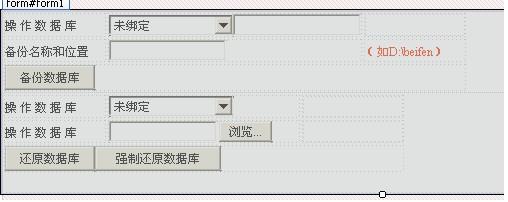
经过试验,大体完成了我需要的功能,具体优化后期进行中。


