

本文实例为大家分享了Android使用SoundPool播放音效的具体代码,供大家参考,具体内容如下
SoundPool(int maxStreams, int streamType, int srcQuality) 参数依次是:
①指定支持多少个声音,SoundPool对象中允许同时存在的最大流的数量。
②指定声音类型,流类型可以分为STREAM_VOICE_CALL(通话), STREAM_SYSTEM(系统), STREAM_RING(铃声),STREAM_MUSIC(媒体音量) 和STREAM_ALARM(警报)四种类型。在AudioManager中定义。
③指定声音品质(采样率变换质量),一般直接设置为0!、
以下是对它的常用方法的介绍:
1.加载声音资源
load(Context context,int resid,int priority)
load(String path,int priority)
load(FileDescriptor fd,long offset,long length,int priority)
load(AssetFileDescriptor afd,int priority)
参数介绍:
2.播放控制
play(int soundID,float leftVolume,float rightVolume,int priority,int loop,float rate)
参数依次是:
3.资源释放
方法:可以通过release()方法释放所有SoundPool对象所占据的内存和资源,也可以根据声音ID来释放。
下面是使用SoundPool实现的一个代码示例:
1. 运行效果图:
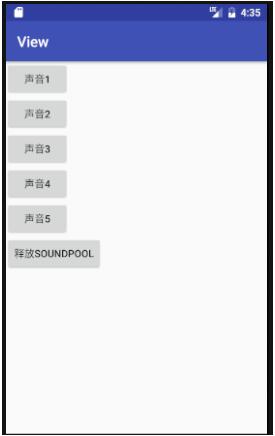
2. MainActivity代码:
import android.content.res.AssetManager;
import android.media.AudioManager;
import android.media.SoundPool;
import android.os.Bundle;
import android.support.v7.app.AppCompatActivity;
import android.view.View;
import android.widget.Button;

import java.util.HashMap;

public class MainActivity extends AppCompatActivity implements View.OnClickListener{

 private Button btnOne;
 private Button btnTwo;
 private Button btnThree;
 private Button btnFour;
 private Button btnFive;
 private Button btn_release;
 private AssetManager aManager;
 private SoundPool mSoundPool = null;
 private HashMap<Integer, Integer> soundID = new HashMap<Integer, Integer>();

 @Override
 protected void onCreate(Bundle savedInstanceState) {
  super.onCreate(savedInstanceState);
  setContentView(R.layout.activity_main);
  aManager = getAssets();
  try {
   initSP();
  } catch (Exception e) {
   e.printStackTrace();
  }
  bindViews();
 }

 private void bindViews() {
  btnOne = (Button) findViewById(R.id.btn_play1);
  btnTwo = (Button) findViewById(R.id.btn_play2);
  btnThree = (Button) findViewById(R.id.btn_play3);
  btnFour = (Button) findViewById(R.id.btn_play4);
  btnFive = (Button) findViewById(R.id.btn_play5);
  btn_release = (Button) findViewById(R.id.btn_release);

  btnOne.setOnClickListener(this);
  btnTwo.setOnClickListener(this);
  btnThree.setOnClickListener(this);
  btnFour.setOnClickListener(this);
  btnFive.setOnClickListener(this);
  btn_release.setOnClickListener(this);

 }

 private void initSP() throws Exception{
  //设置最多可容纳5个音频流,音频的品质为5
  mSoundPool = new SoundPool(5, AudioManager.STREAM_SYSTEM, 5);
  soundID.put(1, mSoundPool.load(this, R.raw.duang, 1));
  soundID.put(2 , mSoundPool.load(getAssets().openFd("biaobiao.mp3") , 1)); //需要捕获IO异常
  soundID.put(3, mSoundPool.load(this, R.raw.duang, 1));
  soundID.put(4, mSoundPool.load(this, R.raw.duang, 1));
  soundID.put(5, mSoundPool.load(this, R.raw.duang, 1));
 }

 @Override
 public void onClick(View v) {
  switch (v.getId()){
   case R.id.btn_play1:
    mSoundPool.play(soundID.get(1), 1, 1, 0, 0, 1);
    break;
   case R.id.btn_play2:
    mSoundPool.play(soundID.get(2), 1, 1, 0, 0, 1);
    break;
   case R.id.btn_play3:
    mSoundPool.play(soundID.get(3), 1, 1, 0, 0, 1);
    break;
   case R.id.btn_play4:
    mSoundPool.play(soundID.get(4), 1, 1, 0, 0, 1);
    break;
   case R.id.btn_play5:
    mSoundPool.play(soundID.get(5), 1, 1, 0, 0, 1);
    break;
   case R.id.btn_release:
    mSoundPool.release(); //回收SoundPool资源
    break;
  }
 }
}
3. activity_main.xml
<LinearLayout xmlns:android="http://schemas.android.com/apk/res/android"
 xmlns:tools="http://schemas.android.com/tools"
 android:layout_width="match_parent"
 android:layout_height="match_parent"
 android:orientation="vertical"
 tools:context=".MainActivity">


 <Button
  android:id="@+id/btn_play1"
  android:layout_width="wrap_content"
  android:layout_height="wrap_content"
  android:text="声音1" />


 <Button
  android:id="@+id/btn_play2"
  android:layout_width="wrap_content"
  android:layout_height="wrap_content"
  android:text="声音2" />

 <Button
  android:id="@+id/btn_play3"
  android:layout_width="wrap_content"
  android:layout_height="wrap_content"
  android:text="声音3" />

 <Button
  android:id="@+id/btn_play4"
  android:layout_width="wrap_content"
  android:layout_height="wrap_content"
  android:text="声音4" />

 <Button
  android:id="@+id/btn_play5"
  android:layout_width="wrap_content"
  android:layout_height="wrap_content"
  android:text="声音5" />

 <Button
  android:id="@+id/btn_release"
  android:layout_width="wrap_content"
  android:layout_height="wrap_content"
  android:text="释放SoundPool" />

</LinearLayout>
点击声音1~5按钮会发出声音,但当点击最后一个release按钮将SoundPool释放后,再去按就没有任何效果了哦。
以上就是本文的全部内容,希望对大家的学习有所帮助,也希望大家多多支持脚本之家。


