

一、Android Color设置
1、在xml文件中
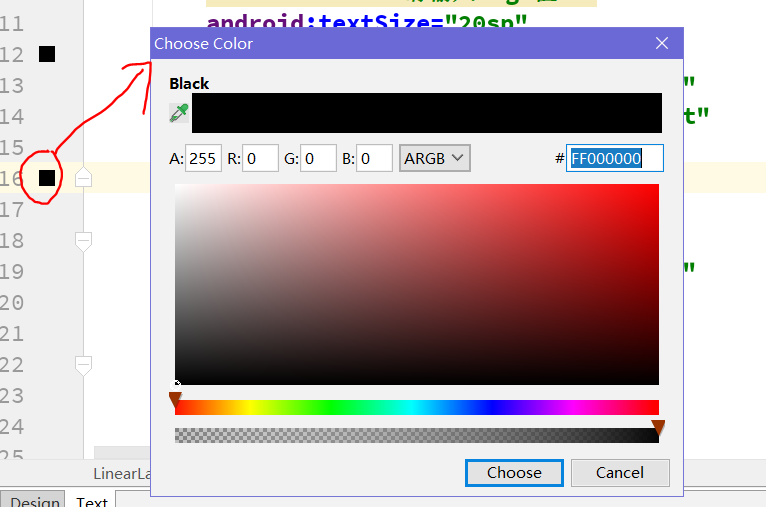
想设置颜色直接设置background的属性或者其他的color属性。随便设置一个颜色如#000,再点击左边的颜色方块,弹出颜色选择器选择颜色
2、在java代码中
①Color.parseColor("#000");
tvShow.setBackgroundColor(Color.parseColor("#000"));
【提示】可以在布局文件中配置好颜色值,然后把用“#”表示的颜色带到java代码中用
②Color.BLACK 使用Color类自带的颜色,不过都是一些基本色
tvShow.setBackgroundColor(Color.BLACK);
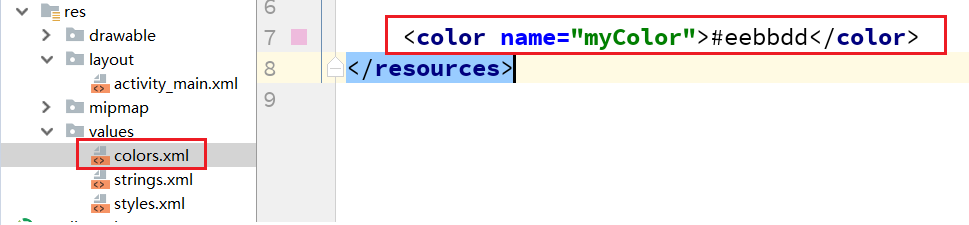
③定义Color资源文件,通过R.color.myColor引用
int color = R.color.myColor;
tvShow.setBackgroundResource(R.color.myColor);
④Color.argb(a,r,g,b)方法:
tvShow.setBackgroundColor(Color.argb(255, 255, 0, 0));
分别是alpha、红(red)、绿(green)、蓝(blue)四个颜色值(ARGB)。每个数字取值0-255,因此一个颜色可以用一个整数来表示。为了运行效率,Android编码时用整数Color类实例来表示颜色。
【提示】通过此方法传入对应的透明度值,红色值,绿色值,蓝色值进行颜色配置。因此我们可以通过此方法做一个简单的颜色配置器。
二、颜色配置器案例
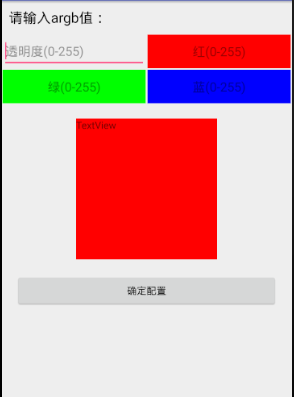
1、【效果】
界面设计的比较粗糙,希望大家能学到实现效果,优化界面。
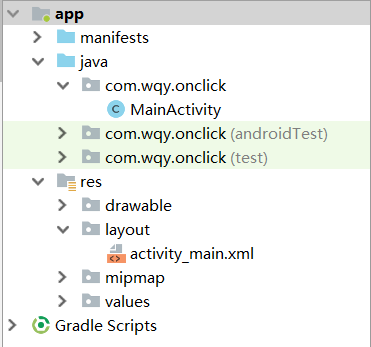
2、【项目结构】
3、【代码】
①activity_main.xml布局文件
 <?xml version="1.0" encoding="utf-8"?>
<LinearLayout xmlns:android="http://schemas.android.com/apk/res/android"
 xmlns:tools="http://schemas.android.com/tools"
 android:layout_width="match_parent"
 android:layout_height="match_parent"
 tools:context=".MainActivity"
 android:orientation="vertical">
 <TextView
  android:text="请输入argb值:"
  android:textSize="20sp"
  android:textColor="#000"
  android:layout_width="match_parent"
  android:layout_height="wrap_content"
  android:layout_margin="10dp"/>
 <LinearLayout
  android:layout_width="match_parent"
  android:layout_height="50dp"
  android:orientation="horizontal">
  <EditText
   android:id="@+id/etA"
   android:layout_width="0dp"
   android:layout_weight="1"
   android:layout_height="match_parent"
   android:layout_margin="1dp"
   android:hint="透明度(0-255)"
   android:inputType="number"/>
  <EditText
   android:id="@+id/etR"
   android:hint="红(0-255)"
   android:layout_width="0dp"
   android:layout_weight="1"
   android:layout_height="match_parent"
   android:background="#f00"
   android:layout_margin="1dp"
   android:gravity="center"
   android:inputType="number"/>
 </LinearLayout>
 <LinearLayout
  android:layout_width="match_parent"
  android:layout_height="50dp"
  android:orientation="horizontal">
  <EditText
   android:id="@+id/etG"
   android:hint="绿(0-255)"
   android:layout_width="0dp"
   android:layout_weight="1"
   android:layout_height="match_parent"
   android:background="#0f0"
   android:layout_margin="1dp"
   android:gravity="center"
   android:inputType="number"/>
  <EditText
   android:id="@+id/etB"
   android:hint="蓝(0-255)"
   android:layout_width="0dp"
   android:layout_weight="1"
   android:layout_height="match_parent"
   android:background="#00f"
   android:layout_margin="1dp"
   android:gravity="center"
   android:inputType="number"/>
 </LinearLayout>
 <TextView
  android:id="@+id/tv_show"
  android:text="TextView"
  android:layout_width="200dp"
  android:layout_height="200dp"
  android:background="#000"
  android:layout_gravity="center"
  android:layout_marginTop="20dp"
  />
 <Button
  android:id="@+id/btn"
  android:text="确定配置"
  android:layout_margin="20dp"
  android:layout_width="match_parent"
  android:layout_height="wrap_content" />
</LinearLayout>
【提示】EditText 中hint属性:这是设置输入框内的提示文字。 inputType属性:设置输入框输入的文本类型,此处设置为整数型
②MainActivity.java文件
public class MainActivity extends AppCompatActivity implements View.OnClickListener {
 private EditText etA;
 private EditText etR;
 private EditText etG;
 private EditText etB;
 private TextView tvShow;
 private Button btn;
 @Override
 protected void onCreate(Bundle savedInstanceState) {
  super.onCreate(savedInstanceState);
  setContentView(R.layout.activity_main);
  initView();
 }
 private void initView() {
  etA = (EditText) findViewById(R.id.etA);
  etR = (EditText) findViewById(R.id.etR);
  etG = (EditText) findViewById(R.id.etG);
  etB = (EditText) findViewById(R.id.etB);
  tvShow = (TextView) findViewById(R.id.tv_show);
  btn = (Button) findViewById(R.id.btn);
  btn.setOnClickListener(this);
 }
 @Override
 public void onClick(View v) {
  switch (v.getId()) {
   case R.id.btn:
    submit();
    break;
  }
 }
 private void submit() {
  // validate
  if (!etA.getText().equals("")&&!etB.getText().equals("")
    &&!etR.getText().equals("")&&!etG.getText().equals("")) {
   //对用户输入的数值进行判断是否为空。避免空字符无法转换为int异常
   int et_a = Integer.parseInt(etA.getText().toString());
   int et_r = Integer.parseInt(etR.getText().toString());
   int et_g = Integer.parseInt(etG.getText().toString());
   int et_b = Integer.parseInt(etB.getText().toString());
   tvShow.setBackgroundColor(Color.argb(et_a, et_r, et_g, et_b));
  }else {
   Toast.makeText(this, "输入的值不能为空", Toast.LENGTH_SHORT).show();
  }
 }
}
以上所述是小编给大家介绍的Android颜色配置器配置方法,希望对大家有所帮助,如果大家有任何疑问请给我留言,小编会及时回复大家的。在此也非常感谢大家对脚本之家网站的支持!


