

本文实例为大家分享了Android实现搜索框展示的具体代码,供大家参考,具体内容如下
展示效果
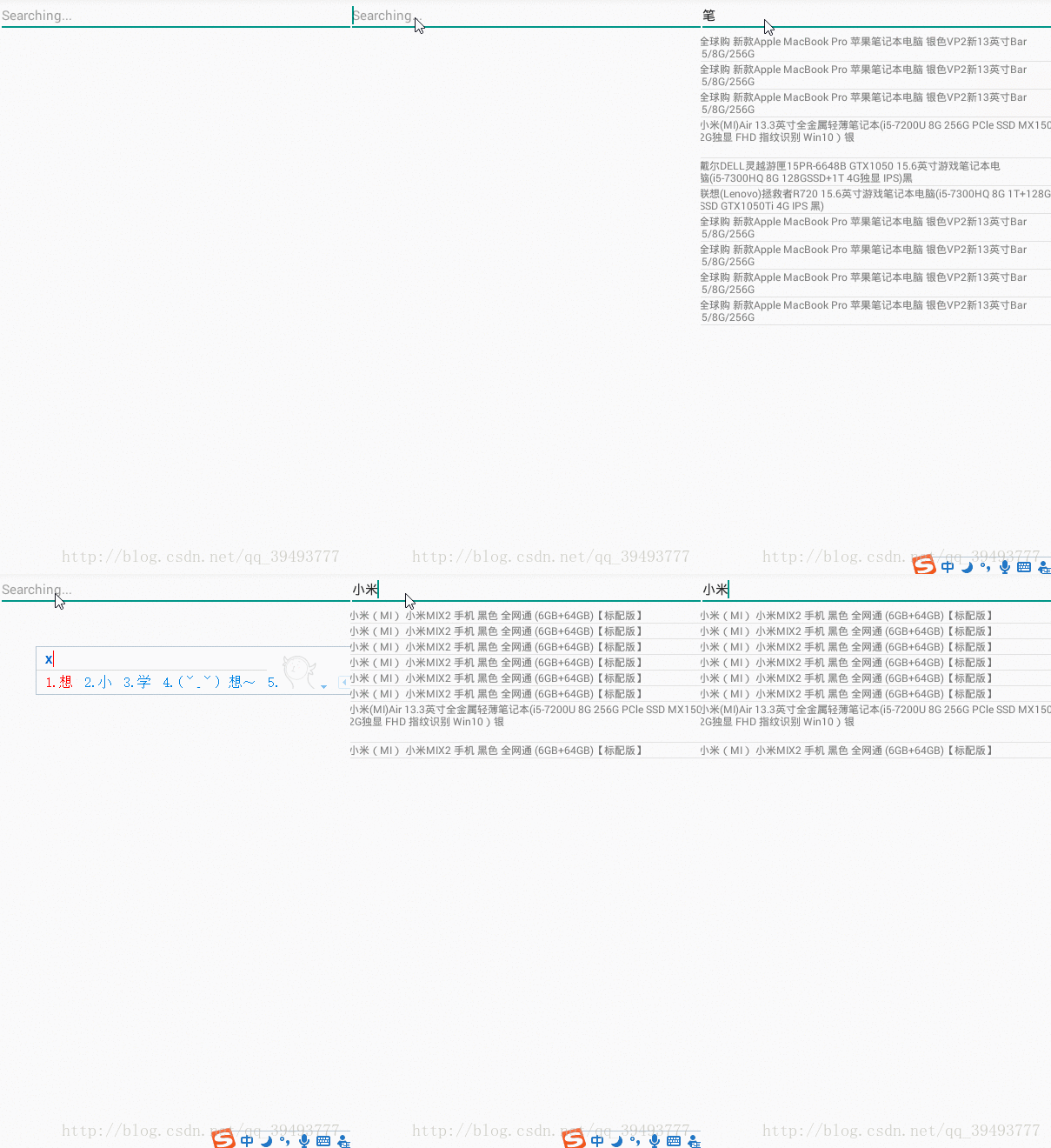
代码区
SouActivity
public class SouActivity extends AppCompatActivity implements TextWatcher{
  @BindView(R.id.app_sou)
  EditText appSou;
  @BindView(R.id.app_sou_list)
  ListView appSouList;
  @BindView(R.id.activity_sou)
  RelativeLayout activitySou;
  private String mUrl = "http://120.27.23.105/product/searchProducts";
  private List<MySouFr.DataBean> sdata;
  private MyBase myBase;
  private String asou;

  @Override
  protected void onCreate(Bundle savedInstanceState) {
    super.onCreate(savedInstanceState);
    setContentView(R.layout.activity_sou);
    ButterKnife.bind(this);
    sdata=new ArrayList<MySouFr.DataBean>();
    appSou.addTextChangedListener(this);
    appSou.setOnFocusChangeListener(new View.OnFocusChangeListener() {
      @Override
      public void onFocusChange(View view, boolean b) {
        if(b)
        {
          appSou.setText("");
        }
      }
    });


  }

  @Override
  public void beforeTextChanged(CharSequence charSequence, int i, int i1, int i2) {

  }

  @Override
  public void onTextChanged(CharSequence charSequence, int i, int i1, int i2) {
    //获取输入框的值
    asou = appSou.getText().toString().trim();

      OkHttp3Utils.getInstance().doGet(mUrl + "?keywords=" + asou + "&page=1", new GsonObjectCallback<MySouFr>() {

        @Override
        public void onUi(final MySouFr mySouFr) {
          /*适配器*/
          if (asou !=null&&!asou.equals("")) {
            sdata = mySouFr.getData();
            myBase = new MyBase();
            appSouList.setAdapter(myBase);
            appSouList.setOnItemClickListener(new AdapterView.OnItemClickListener() {
              @Override
              public void onItemClick(AdapterView<?> adapterView, View view, int i, long l) {
                Intent intent = new Intent(SouActivity.this, Sou_item_Activity.class);
                intent.putExtra("url",mySouFr.getData().get(i).getDetailUrl());
                startActivity(intent);
//                Toast.makeText(SouActivity.this, "假装你已经点击了哦!", Toast.LENGTH_SHORT).show();
              }
            });
          } else if(myBase!=null) {
            sdata.clear();
            myBase.notifyDataSetChanged();
          }
        }

        @Override
        public void onFailed(Call call, IOException e) {

        }
      });
    }


  @Override
  public void afterTextChanged(Editable editable) {

  }

  class MyBase extends BaseAdapter{

    @Override
    public int getCount() {
      return sdata.size();
    }

    @Override
    public Object getItem(int i) {
      return sdata.get(i);
    }

    @Override
    public long getItemId(int i) {
      return i;
    }

    @Override
    public View getView(int i, View view, ViewGroup viewGroup) {
      Vh vh=null;
      if(view==null){
        view=View.inflate(SouActivity.this,R.layout.item_sou,null);
        vh=new Vh();
        vh.tv1=(TextView) view.findViewById(R.id.item_sou_text1);
        view.setTag(vh);
      }else{
        vh = (Vh) view.getTag();
      }
      Log.d("main",sdata.get(i).getTitle());
      vh.tv1.setText(sdata.get(i).getTitle());
      return view;
    }
  }
  class Vh{
    TextView tv1;
  }
}
activity_sou
<?xml version="1.0" encoding="utf-8"?>
<RelativeLayout xmlns:android="http://schemas.android.com/apk/res/android"
  xmlns:tools="http://schemas.android.com/tools"
  android:id="@+id/activity_sou"
  android:layout_width="match_parent"
  android:layout_height="match_parent"
  tools:context="sizu.nsg.SouActivity">
  <EditText
    android:id="@+id/app_sou"
    android:layout_width="match_parent"
    android:layout_height="wrap_content"
    android:hint="Searching..."
    />
  <ListView
    android:id="@+id/app_sou_list"
    android:layout_below="@id/app_sou"
    android:layout_width="match_parent"
    android:layout_height="match_parent">
  </ListView>

</RelativeLayout>
item_sou
<?xml version="1.0" encoding="utf-8"?>
<RelativeLayout xmlns:android="http://schemas.android.com/apk/res/android"
  android:layout_width="match_parent"
  android:layout_height="match_parent">
  <TextView
    android:id="@+id/item_sou_text1"
    android:layout_width="match_parent"
    android:layout_height="wrap_content"
    android:text="123"
    />
</RelativeLayout>
以上就是本文的全部内容,希望对大家的学习有所帮助,也希望大家多多支持脚本之家。


