

最近一直在看RecyclerView,较之ListView它确实是灵活多变,给予开发者更多自定义的空间,比如:需要添加头部和尾部、item的点击事件、自定义的LayoutManager,还有就是下面要说的自定义的分割线。
1、如何理解分割线
经常听到有人说自定义分割线麻烦,为什么不把分割线写到item布局里,这样不是更简单吗?有些情况把分割线写到item布局里是很难达到我们想要的效果,例如RecyclerView里的GridLayoutManager,StaggeredGridLayoutManager和一些自定义的LayoutManager,不同位置的item需要画的分割线并不相同,这时候应用自定义的分割线就能很好的解决这个问题。
2、如何画分割线
网上也有很多关于RecyclerView自定义分割线的写法,很多都是通过获取系统属性中的listDivider来添加,在系统中的AppTheme中设置,但是如果我有两种风格的分割线,这就尴尬了呀,所以我希望像ListView一样能传入一个drawable来设置分割线,所以我们的思路就是最终能像下面这样设置分割线:
3、具体代码实现
由于RecyclerView的布局方式多种多样,所以它的分割线也根据布局的不同有所差异,本文只针对LinearLayoutManager线性布局
现在给出完整的类,代码中关键地方都有注释,就不再一一说明:
public class CustomDecoration extends RecyclerView.ItemDecoration {

 public static final int HORIZONTAL_LIST = LinearLayoutManager.HORIZONTAL;

 public static final int VERTICAL_LIST = LinearLayoutManager.VERTICAL;

 private Drawable mDivider;

 private int mOrientation;

 /**
  * 分割线缩进值
  */
 private int inset;

 private Paint paint;

 /**
  * @param context
  * @param orientation layout的方向
  * @param drawable  引入的drawable的ID
  * @param inset    分割线缩进值
  */
 public CustomDecoration(Context context, int orientation, int drawable, int inset) {
   mDivider = context.getResources().getDrawable(drawable);
   this.inset = inset;
   paint = new Paint();
   paint.setColor(context.getResources().getColor(R.color.white));
   paint.setStyle(Paint.Style.FILL);
   paint.setAntiAlias(true);
   setOrientation(orientation);
 }

 public void setOrientation(int orientation) {
   if (orientation != HORIZONTAL_LIST && orientation != VERTICAL_LIST) {
     throw new IllegalArgumentException("invalid orientation");
   }
   mOrientation = orientation;
 }

 @Override
 public void onDraw(Canvas c, RecyclerView parent) {
   if (mOrientation == VERTICAL_LIST) {
     drawVertical(c, parent);
   } else {
     drawHorizontal(c, parent);
   }
 }

 private void drawVertical(Canvas c, RecyclerView parent) {
   final int left = parent.getPaddingLeft();
   final int right = parent.getWidth() - parent.getPaddingRight();

   final int childCount = parent.getChildCount();
   //最后一个item不画分割线
   for (int i = 0; i < childCount - 1; i++) {
     final View child = parent.getChildAt(i);
     final RecyclerView.LayoutParams params = (RecyclerView.LayoutParams) child.getLayoutParams();
     final int top = child.getBottom() + params.bottomMargin;
     final int bottom = top + mDivider.getIntrinsicHeight();
     if (inset > 0) {
       c.drawRect(left, top, right, bottom, paint);
       mDivider.setBounds(left + inset, top, right - inset, bottom);
     } else {
       mDivider.setBounds(left, top, right, bottom);
     }
     mDivider.draw(c);
   }
 }

 private void drawHorizontal(Canvas c, RecyclerView parent) {
   final int top = parent.getPaddingTop();
   final int bottom = parent.getHeight() - parent.getPaddingBottom();

   final int childCount = parent.getChildCount();
   for (int i = 0; i < childCount - 1; i++) {
     final View child = parent.getChildAt(i);
     final RecyclerView.LayoutParams params = (RecyclerView.LayoutParams) child.getLayoutParams();
     final int left = child.getRight() + params.rightMargin;
     final int right = left + mDivider.getIntrinsicHeight();
     mDivider.setBounds(left, top, right, bottom);
     mDivider.draw(c);
   }
 }

 //由于Divider也有宽高,每一个Item需要向下或者向右偏移
 @Override
 public void getItemOffsets(Rect outRect, int itemPosition, RecyclerView parent) {
   if (mOrientation == VERTICAL_LIST) {
     outRect.set(0, 0, 0, mDivider.getIntrinsicHeight());
   } else {
     outRect.set(0, 0, mDivider.getIntrinsicWidth(), 0);
   }
 }
}
4、具体怎么用
RecyclerView的三部曲
recyclerView.setLayoutManager(new LinearLayoutManager(this));
recyclerView.addItemDecoration(new CustomDecoration(this, CustomDecoration.VERTICAL_LIST, R.drawable.divider_love, UnitHelper.dip2px(this, 15)));
recyclerView.setAdapter(adapter);
R.drawable.divider_love
<shape xmlns:android="http://schemas.android.com/apk/res/android"
 android:shape="rectangle">
 <solid android:color="#CB8589"/>
 <size android:height="15dp"/>
</shape>
对应的效果如下:
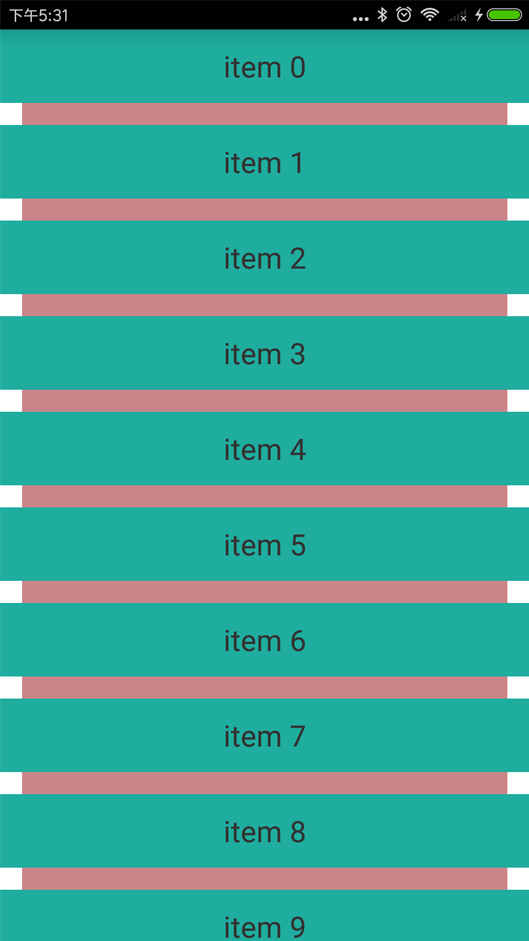
我们可以看到明显的缩进效果,设置成零就没有缩进了。
还是看看正常使用中是什么样子吧
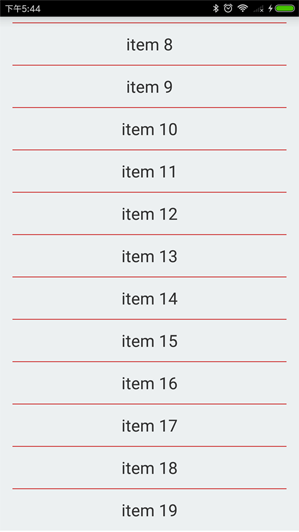
对应的 R.drawable.divider_love
<shape xmlns:android="http://schemas.android.com/apk/res/android"
  android:shape="rectangle">
  <solid android:color="#CD3131"/>
  <size android:height="1dp"/>
</shape>
我们只需要修改下CustomDecoration中paint的颜色就可以让缩进的颜色和背景色一致了,默认是白色。
paint.setColor(Color.parseColor("#ECF0F1"));
以上就是本文的全部内容,希望对大家的学习有所帮助,也希望大家多多支持脚本之家。


