

做一个自定义View的小练习,效果如下
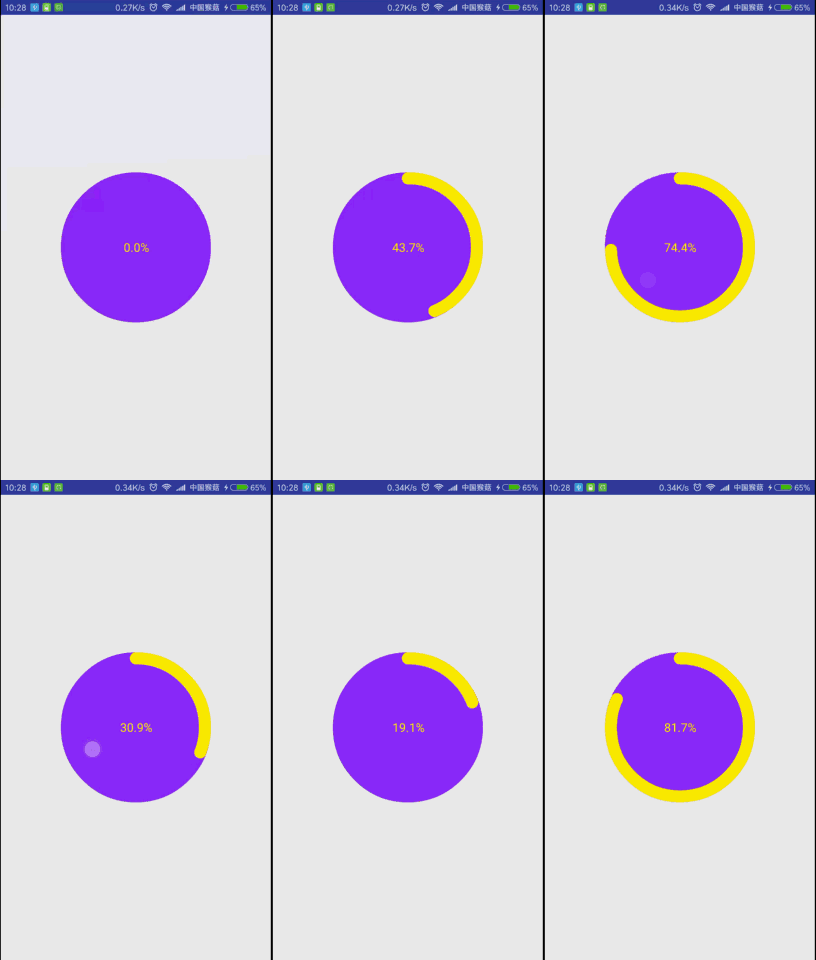
只需要画一个圆、一个圆弧、一个百分比文本,添加一个点击事件,传入百分比重绘
1、在res/values文件夹下新建attrs.xml文件,编写自定义属性:
<?xml version="1.0" encoding="utf-8"?>
<resources>
  <declare-styleable name="CirclePercentView" >
    <attr name="circleBg" format="color"/>
    <attr name="arcColor" format="color"/>
    <attr name="arcWidth" format="dimension"/>
    <attr name="percentTextColor" format="color"/>
    <attr name="percentTextSize" format="dimension"/>
    <attr name="radius" format="dimension"/>
  </declare-styleable>
</resources>
2、新建CirclePercentView继承View,重写构造方法:
public CirclePercentView(Context context) {
    this(context, null);
  }

  public CirclePercentView(Context context, AttributeSet attrs) {
    this(context, attrs, 0);
  }

  public CirclePercentView(Context context, AttributeSet attrs, int defStyleAttr) {
    super(context, attrs, defStyleAttr);
  }
3、在第三个构造方法中获取自定义属性的值:
    TypedArray ta = context.obtainStyledAttributes(attrs, R.styleable.CirclePercentView, defStyleAttr, 0);
    mCircleColor = ta.getColor(R.styleable.CirclePercentView_circleBg, 0xff8e29fa);
    mArcColor = ta.getColor(R.styleable.CirclePercentView_arcColor, 0xffffee00);
    mArcWidth = ta.getDimensionPixelSize(R.styleable.CirclePercentView_arcWidth, DensityUtils.dp2px(context, 16));
    mPercentTextColor = ta.getColor(R.styleable.CirclePercentView_arcColor, 0xffffee00);
    mPercentTextSize = ta.getDimensionPixelSize(R.styleable.CirclePercentView_percentTextSize, DensityUtils.sp2px(context, 16));
    mRadius = ta.getDimensionPixelSize(R.styleable.CirclePercentView_radius, DensityUtils.dp2px(context, 100));
    ta.recycle();
4、创建画图所使用的对象,如Paint、Rect、RectF:
    mCirclePaint = new Paint(Paint.ANTI_ALIAS_FLAG);
    mCirclePaint.setStyle(Paint.Style.FILL);
    mCirclePaint.setColor(mCircleColor);

    mArcPaint = new Paint(Paint.ANTI_ALIAS_FLAG);
    mArcPaint.setStyle(Paint.Style.STROKE);
    mArcPaint.setStrokeWidth(mArcWidth);
    mArcPaint.setColor(mArcColor);
    mArcPaint.setStrokeCap(Paint.Cap.ROUND);//使圆弧两头圆滑

    mPercentTextPaint = new Paint(Paint.ANTI_ALIAS_FLAG);
    mPercentTextPaint.setStyle(Paint.Style.STROKE);
    mPercentTextPaint.setColor(mPercentTextColor);
    mPercentTextPaint.setTextSize(mPercentTextSize);

    mArcRectF = new RectF();//圆弧的外接矩形

    mTextBound = new Rect();//文本的范围矩形
5、重写onMeasure()方法,计算自定义View的宽高:
 @Override
  protected void onMeasure(int widthMeasureSpec, int heightMeasureSpec) {
    setMeasuredDimension(measureDimension(widthMeasureSpec), measureDimension(heightMeasureSpec));
  }

  private int measureDimension(int measureSpec) {
    int result;
    int specMode = MeasureSpec.getMode(measureSpec);
    int specSize = MeasureSpec.getSize(measureSpec);
    if (specMode == MeasureSpec.EXACTLY) {//精确地,代表宽高为定值或者match_parent时
      result = specSize;
    } else {
      result = 2 * mRadius;
      if (specMode == MeasureSpec.AT_MOST) {//最大地,代表宽高为wrap_content时
        result = Math.min(result, specSize);
      }
    }
    return result;
  }
6、重写onDraw()方法,绘制圆、圆弧和百分比文本,注意坐标的计算:
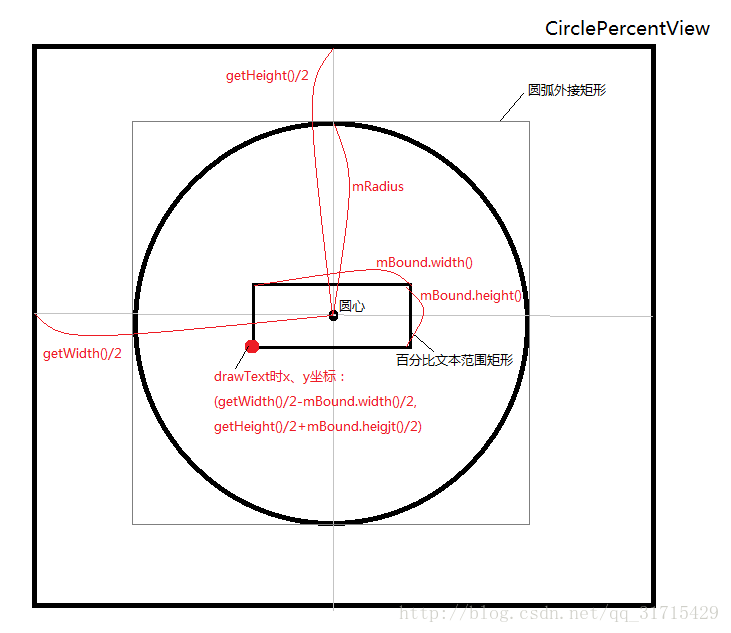
  @Override
  protected void onDraw(Canvas canvas) {
    //画圆
    canvas.drawCircle(getWidth() / 2, getHeight() / 2, mRadius, mCirclePaint);

    //画圆弧
    mArcRectF.set(getWidth() / 2 - mRadius + mArcWidth / 2, getHeight() / 2 - mRadius + mArcWidth / 2
        , getWidth() / 2 + mRadius - mArcWidth / 2, getHeight() / 2 + mRadius - mArcWidth / 2);
    canvas.drawArc(mArcRectF, 270, 360 * mCurPercent / 100, false, mArcPaint);

    String text = mCurPercent + "%";
    //计算文本宽高
    mPercentTextPaint.getTextBounds(text, 0, String.valueOf(text).length(), mTextBound);
    //画百分比文本
    canvas.drawText(text, getWidth() / 2 - mTextBound.width() / 2
        , getHeight() / 2 + mTextBound.height() / 2, mPercentTextPaint);
  }
7、给这个view设置点击事件,暴露一个动态设置百分比的方法:
  public void setCurPercent(float curPercent) {
    ValueAnimator anim = ValueAnimator.ofFloat(mCurPercent, curPercent);
    //动画时长由百分比大小决定
    anim.setDuration((long) (Math.abs(mCurPercent - curPercent) * 20));
    anim.addUpdateListener(new ValueAnimator.AnimatorUpdateListener() {
      @Override
      public void onAnimationUpdate(ValueAnimator animation) {
        float value = (float) animation.getAnimatedValue();
        mCurPercent = (float) (Math.round(value * 10)) / 10;//四舍五入保留到小数点后两位
        invalidate();//重绘,重走onDraw()方法,这也是不能再onDraw()中创建对象的原因
      }
    });
    anim.start();
  }

  public void setOnCircleClickListener(OnClickListener onClickListener) {
    this.mOnClickListener = onClickListener;
  }

    //在构造方法中
    setOnClickListener(new OnClickListener() {
      @Override
      public void onClick(View v) {
        if (mOnClickListener != null) {
          mOnClickListener.onClick(CirclePercentView.this);
        }
      }
    });
8、在activity_main.xml布局文件中使用该View:
<!-- 使用自定义命名空间namespace,cpv是该控件名的首字母缩写,可以随意取 -->
<RelativeLayout xmlns:android="http://schemas.android.com/apk/res/android"
  xmlns:cpv="http://schemas.android.com/apk/res-auto"
  android:layout_width="match_parent"
  android:layout_height="match_parent">

  <!-- cpv后面的属性名对应attrs.xml文件中的自定义属性名 -->
  <com.monkey.customviewdemo.view.CirclePercentView
    android:id="@+id/circlePercentView"
    android:layout_width="match_parent"
    android:layout_height="match_parent"
    cpv:arcColor="#ffee00"
    cpv:arcWidth="@dimen/activity_horizontal_margin"
    cpv:circleBg="#8e29fa"
    cpv:percentTextColor="#ffee00"
    cpv:percentTextSize="16sp"
    cpv:radius="100dp" />
</RelativeLayout>
9、在MainActivity.java中设置监听,传入百分比:
  mCirclePercentView = (CirclePercentView) findViewById(R.id.circlePercentView);
  mCirclePercentView.setOnCircleClickListener(new View.OnClickListener() {
    @Override
    public void onClick(View v) {
      float percent = (float) (Math.random() * 99 + 1);
      mCirclePercentView.setCurPercent(percent);
    }
  });
代码下载地址:
https://github.com/MonkeyMushroom/CirclePercentView/tree/master
以上就是本文的全部内容,希望对大家的学习有所帮助,也希望大家多多支持脚本之家。


