

今天分享一下登陆界面用户登录名的检测,大家都知道如果在服务器端进行所有用户名的检测是比较浪费资源的。用户每点击一次登陆就要发到服务端去检测,对于服务端来说负荷是比较大的。所以呢在客服端对用户的非法信息进行简单的过滤是非常有必要的。
源码下载:Android用户名检测
首先看一下效果:
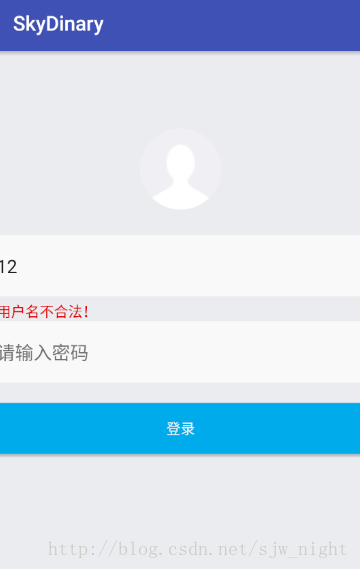
当用户输入的用户名长度小于3,或者大于9时将出现红色提示,并且登陆按钮不可点击。
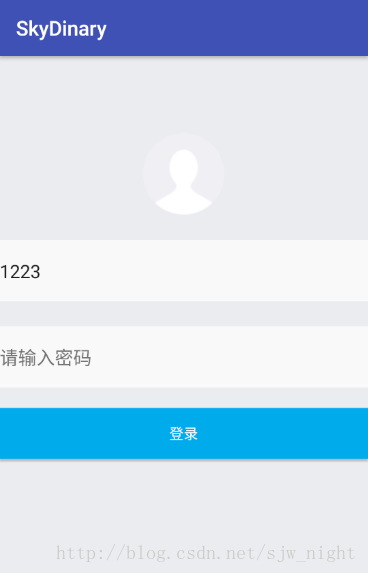
当输入的用户名大在合法区间则提示消失,如果密码不为空则登陆按钮可点击
虽然功能很小却用到了不少的东西:
接下来看一下源码,为了是登陆界面更加美观,我对登陆控件进行了圆形化处理,也就是开源醒目CircleImageView 项目主页地址:https://github.com/hdodenhof/CircleImageView:
<LinearLayout xmlns:android="http://schemas.android.com/apk/res/android"
 xmlns:tools="http://schemas.android.com/tools"
 android:layout_width="match_parent"
 android:layout_height="match_parent"
 android:orientation="vertical"
 android:background="@color/colorLogin"

 >

 <!-- Login progress -->
 <ProgressBar
 android:id="@+id/login_progress"
 style="?android:attr/progressBarStyleLarge"
 android:layout_width="wrap_content"
 android:layout_height="wrap_content"
 android:layout_marginBottom="8dp"
 android:visibility="gone" />
 <RelativeLayout
 android:layout_width="match_parent"
 android:layout_height="180dp"

 android:id="@+id/head_img"
 >

 <de.hdodenhof.circleimageview.CircleImageView
  android:layout_width="80dp"
  android:layout_height="80dp"
  android:src="@mipmap/nav_head"
  android:layout_alignParentBottom="true"
  android:layout_centerHorizontal="true"
  android:layout_marginBottom="25dp" />
 </RelativeLayout>
 <LinearLayout
 android:layout_width="match_parent"
 android:layout_height="wrap_content"
 android:paddingBottom="20dp"
 android:orientation="vertical">
 <EditText
  android:id="@+id/et_user"
  android:layout_width="match_parent"
  android:layout_height="60dp"
  android:hint="@string/userName"
  android:background="@color/colorLoginForm"
  android:layout_marginBottom="5dp"
  />
 <TextView
  android:id="@+id/tv_tip"
  android:layout_width="wrap_content"
  android:layout_height="wrap_content"
  android:textColor="@color/error"
  />
 <EditText
  android:id="@+id/et_pass"
  android:layout_width="match_parent"
  android:layout_height="60dp"
  android:background="@color/colorLoginForm"
  android:hint="@string/passWord"
  android:paddingTop="1dp"
  />
 </LinearLayout>
 <Button
 android:id="@+id/button"
 android:layout_width="match_parent"
 android:layout_height="50dp"
 android:background="@color/loginButton"
 android:text="@string/loginButton"
 android:textColor="@color/colorLoginForm"
 />

</LinearLayout>
然后修改MainAvtivity.class:
public class MainActivity extends AppCompatActivity {
 EditText etUser;
 EditText etPassWord;
 TextView tvTip;
 Button button;
 @Override
 protected void onCreate(Bundle savedInstanceState) {
 super.onCreate(savedInstanceState);
 setContentView(R.layout.activity_main);
 //初始化View控件
 findView();
 //用于检测输入的用户名操作
 checkLength();
 }

 private void checkLength() {
 //为etUser设置焦点改变监听事件
 etUser.setOnFocusChangeListener(new View.OnFocusChangeListener(){
  @Override
  public void onFocusChange(View v, boolean hasFocus) {
  //如果失去焦点则进行用户名的检测
  if(etUser.hasFocus()==false){
   //如果用户名长度小于3或者大于9,则提示用户名错误且登陆不可点击
   if(etUser.getText().toString().length()>9||etUser.getText().toString().length()<3){
   tvTip.setText("用户名不合法!");
   button.setClickable(false);
   }else{
   //如果用户名合法且密码不为空,设置提示字体消失按钮可点击
   if(etPassWord.getText().toString()!=""){
   button.setClickable(true);
   tvTip.setText("");
   }
  }
  }


  }
 });
 }

 private void findView() {
 etUser= (EditText) findViewById(R.id.et_user);
 etPassWord= (EditText) findViewById(R.id.et_pass);
 tvTip= (TextView) findViewById(R.id.tv_tip);
 button= (Button) findViewById(R.id.button);
 }
}
整个代码的核心是编辑框的焦点改变的监听,然后对用户名进行判断。
以上就是本文的全部内容,希望对大家的学习有所帮助,也希望大家多多支持脚本之家。


