

核心思想是通过BitmapFactory.Options来缩放图片,主要是用到了它的inSampleSize参数(采样率)
当inSampleSize为1的时候,采样后的图片大小为图片的原始大小;
当inSampleSize为2的时候,采样后的图片的宽和高是原来的1/2,也就是说,它的像素点是原来的1/4,占的内存自然就是原来的1/4了。以此类推。
当inSampleSize小于1的时候,效果和等于1的时候是一样的。
压缩流程如下:
1.BitmapFactory.Options 的inJustDecodeBounds参数设置为true(这个时候BitmapFactory只是解析图片的原始宽高,并不会去加载图片)。
2.从BitmapFactory.Options 中取出图片的原始宽高,outWidth,outHeight。
3.根据自己的需要设置合适的采样率。
4.BitmapFactory.Options 的inJustDecodeBounds参数设置为false,然后就可以加载图片了。
下面我们看代码:
public Bitmap decodeSampledBitmapFromBytes(byte[] bytes,int reqWidth,int reqHeight){
    final BitmapFactory.Options options = new BitmapFactory.Options();
    options.inJustDecodeBounds = true;
    BitmapFactory.decodeByteArray(bytes,0,bytes.length,options);
    options.inSampleSize = calculateInSampleSize(options,reqWidth,reqHeight);
    options.inJustDecodeBounds = false;
    return BitmapFactory.decodeByteArray(bytes,0,bytes.length,options);
  }


public int calculateInSampleSize(BitmapFactory.Options options,int reqWidth,int reqHeight){
    if(reqWidth == 0 || reqHeight == 0){
      return 1;
    }
    final int width = options.outWidth;
    final int height = options.outHeight;
    int inSampleSize = 1;
    if( width > reqWidth || height > reqHeight){
      final int halfWidth = width / 2;
      final int halfHeight = height / 2;
      while ((halfWidth / inSampleSize) >= reqWidth && (halfHeight / inSampleSize) >= reqHeight){
        inSampleSize *=2;
      }
    }
    return inSampleSize;
  }
如此一来,就完成了一张图片的压缩。另外,BitmapFactory还有其它的decode方法,我们也可以仿照上面的来写。
public Bitmap decodeSampledBitmapFromResource(Resources res,int resId,int reqWidth,int reqHeight){
    final BitmapFactory.Options options = new BitmapFactory.Options();
    options.inJustDecodeBounds = true;
    BitmapFactory.decodeResource(res,resId,options);
    options.inSampleSize = calculateInSampleSize(options,reqWidth,reqHeight);
    options.inJustDecodeBounds = false;
    return BitmapFactory.decodeResource(res,resId,options);
  }
public Bitmap decodeSampledBitmapFromDescrptor(FileDescriptor fd,int reqWidth,int reqHeight){
    final BitmapFactory.Options options = new BitmapFactory.Options();
    options.inJustDecodeBounds = true;
    BitmapFactory.decodeFileDescriptor(fd,null,options);
    options.inSampleSize = calculateInSampleSize(options,reqWidth,reqHeight);
    options.inJustDecodeBounds = false;
    return BitmapFactory.decodeFileDescriptor(fd,null,options);
  }
接下来结合一个小demo来实现一个完整的流程
先把图片压缩类封装起来
public class ImageResizer {
  private static final String TAG = "ImageResizer";

  public ImageResizer(){}

  public Bitmap decodeSampledBitmapFromResource(Resources res,int resId,int reqWidth,int reqHeight){
    final BitmapFactory.Options options = new BitmapFactory.Options();
    options.inJustDecodeBounds = true;
    BitmapFactory.decodeResource(res,resId,options);
    options.inSampleSize = calculateInSampleSize(options,reqWidth,reqHeight);
    options.inJustDecodeBounds = false;
    return BitmapFactory.decodeResource(res,resId,options);
  }

  public Bitmap decodeSampledBitmapFromBytes(byte[] bytes,int reqWidth,int reqHeight){
    final BitmapFactory.Options options = new BitmapFactory.Options();
    Bitmap a = BitmapFactory.decodeByteArray(bytes,0,bytes.length,options);
    Log.d(TAG, "before bitmap : " + a.getRowBytes() * a.getHeight());
    options.inJustDecodeBounds = true;
    BitmapFactory.decodeByteArray(bytes,0,bytes.length,options);
    options.inSampleSize = calculateInSampleSize(options,reqWidth,reqHeight);
    options.inJustDecodeBounds = false;
    Bitmap b = BitmapFactory.decodeByteArray(bytes,0,bytes.length,options);
    Log.d(TAG, "after bitmap : " + b.getRowBytes() * b.getHeight());
    return b;
  }

  public Bitmap decodeSampledBitmapFromDescrptor(FileDescriptor fd,int reqWidth,int reqHeight){
    final BitmapFactory.Options options = new BitmapFactory.Options();
    options.inJustDecodeBounds = true;
    BitmapFactory.decodeFileDescriptor(fd,null,options);
    options.inSampleSize = calculateInSampleSize(options,reqWidth,reqHeight);
    options.inJustDecodeBounds = false;
    return BitmapFactory.decodeFileDescriptor(fd,null,options);
  }

  public int calculateInSampleSize(BitmapFactory.Options options,int reqWidth,int reqHeight){
    if(reqWidth == 0 || reqHeight == 0){
      return 1;
    }
    final int width = options.outWidth;
    final int height = options.outHeight;
    int inSampleSize = 1;
    if( width > reqWidth || height > reqHeight){
      final int halfWidth = width / 2;
      final int halfHeight = height / 2;
      while ((halfWidth / inSampleSize) >= reqWidth && (halfHeight / inSampleSize) >= reqHeight){
        inSampleSize *=2;
      }
    }
    return inSampleSize;
  }
}
然后就可以拿来用了:
activity_main2.xml
<RelativeLayout xmlns:android="http://schemas.android.com/apk/res/android"
  xmlns:tools="http://schemas.android.com/tools"
  android:id="@+id/activity_main2"
  android:layout_width="match_parent"
  android:layout_height="match_parent"
  android:paddingBottom="@dimen/activity_vertical_margin"
  android:paddingLeft="@dimen/activity_horizontal_margin"
  android:paddingRight="@dimen/activity_horizontal_margin"
  android:paddingTop="@dimen/activity_vertical_margin"
  tools:context="com.example.yuan.test.Main2Activity">

  <ImageView
    android:id="@+id/main2Iv"
    android:layout_width="200dp"
    android:layout_height="200dp" />

</RelativeLayout>
Main2Activity.Java
public class Main2Activity extends AppCompatActivity {

  private ImageView iv;

  @Override
  protected void onCreate(Bundle savedInstanceState) {
    super.onCreate(savedInstanceState);
    setContentView(R.layout.activity_main2);
    initView();
    testHttp(iv);
  }

  private void testHttp(final ImageView iv) {

    new Thread(new Runnable() {
      @Override
      public void run() {
        String urlString = "https://static.pexels.com/photos/295818/pexels-photo-295818.jpeg";
        HttpURLConnection urlConnection = null;
        InputStream in = null;
        ByteArrayOutputStream outStream = null;
        try {
          URL url = new URL(urlString);
          urlConnection = (HttpURLConnection) url.openConnection();
          in = urlConnection.getInputStream();
          byte[] buffer = new byte[1024];
          int len;
          outStream = new ByteArrayOutputStream();
          while ((len = in.read(buffer)) != -1){
            outStream.write(buffer,0,len);
          }
          final byte[] data = outStream.toByteArray();
          runOnUiThread(new Runnable() {
            @Override
            public void run() { //在主线程加载UI
              iv.setImageBitmap(new ImageResizer().decodeSampledBitmapFromBytes(data,200,200));
            }
          });
        } catch (IOException e) {
          e.printStackTrace();
        }finally {
          try {
            if(urlConnection !=null){
              urlConnection.disconnect();
            }
            if(in != null){
              in.close();
            }
            if(outStream != null){
              outStream.close();
            }
          } catch (IOException e) {
            e.printStackTrace();
          }
        }
      }
    }).start();
  }

  private void initView() {
    iv = (ImageView) findViewById(R.id.main2Iv);
  }
}
最后记得获取网络权限
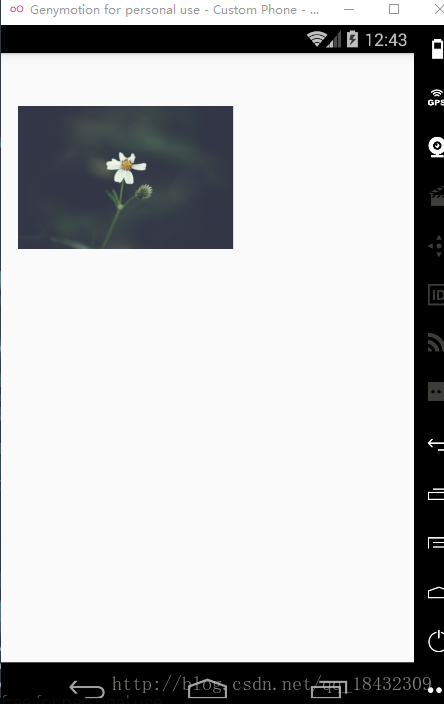
运行的结果:
压缩前后的bitmap大小对比

压缩前后的bitmap大小对比
以上就是本文的全部内容,希望对大家的学习有所帮助,也希望大家多多支持脚本之家。


