

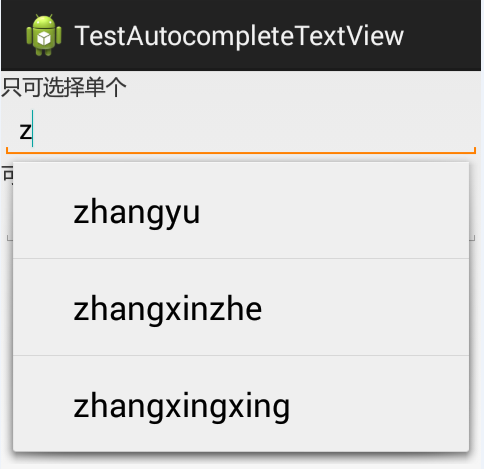
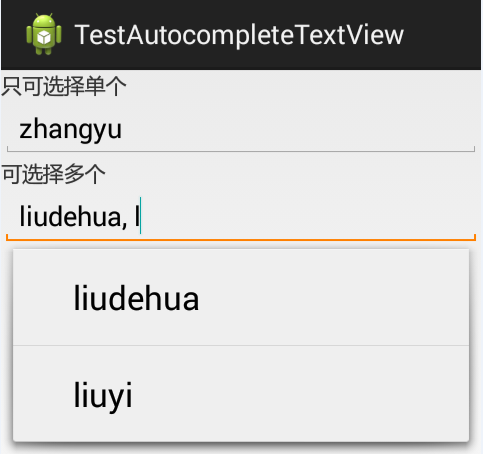
以在搜索框搜索时,自动补全为例:
其中还涉及到一个词,Tokenizer:分词器,分解器。
上效果图:
MainActivity.java:
package com.joan.testautocomletetextview;
import android.R.array;
import android.os.Bundle;
import android.app.Activity;
import android.content.res.Resources;
import android.view.Menu;
import android.widget.ArrayAdapter;
import android.widget.AutoCompleteTextView;
import android.widget.MultiAutoCompleteTextView;
import android.widget.MultiAutoCompleteTextView.Tokenizer;
public class MainActivity extends Activity {
 AutoCompleteTextView actv;
 MultiAutoCompleteTextView mactv;
 @Override
 protected void onCreate(Bundle savedInstanceState) {
  super.onCreate(savedInstanceState);
  setContentView(R.layout.activity_main);
  actv = (AutoCompleteTextView) findViewById(R.id.actv);
  mactv = (MultiAutoCompleteTextView) findViewById(R.id.mactv);
  // 取到Strings.xml中定义的数组
  String[] names = this.getResources().getStringArray(R.array.names);
  // 适配器
  // 第三个参数是数据源
  // 第二个参数是样式资源的id
  ArrayAdapter<String> adapter = new ArrayAdapter<String>(this,
  android.R.layout.simple_expandable_list_item_1, names);
  // =============只能选择单个的自动补全=====================
  actv.setAdapter(adapter);
  // =============可选择多个的自动补全=====================
  // Tokenizer分词器,分解器
  // MultiAutoCompleteTextView.CommaTokenizer();这个简易的分解器可用于对由逗号和若干空格分割的列表进行分解.
  Tokenizer t = new MultiAutoCompleteTextView.CommaTokenizer();
  mactv.setAdapter(adapter);
  mactv.setTokenizer(t);
 }
}
strings.xml:
<?xml version="1.0" encoding="utf-8"?>
<resources>
 <string name="app_name">TestAutocompleteTextView</string>
 <string name="action_settings">Settings</string>
 <string name="hello_world">Hello world!</string>
 <!--定义一个数组 -->
 <string-array name="names">
  <item >zhangyu</item>
  <item >zhangxinzhe</item>
  <item >zhangxingxing</item>
  <item >liudehua</item>
  <item >liuyi</item>
 </string-array>
</resources>
activity_main.xml:
<LinearLayout xmlns:android="http://schemas.android.com/apk/res/android"
 xmlns:tools="http://schemas.android.com/tools"
 android:layout_width="match_parent"
 android:layout_height="match_parent"
 android:orientation="vertical"
 >
 <TextView
  android:layout_width="wrap_content"
  android:layout_height="wrap_content"
  android:text="只可选择单个"
  />
 <!--AutoCompleteTextView 自动补全,只能选择一个值
  android:completionThreshold="1" 输入第一个字后自动补全 -->
 <AutoCompleteTextView
  android:id="@+id/actv"
  android:layout_width="match_parent"
  android:layout_height="wrap_content"
  android:hint="请输入搜索的名字"
  android:completionThreshold="1"
  />
 <TextView
  android:layout_width="wrap_content"
  android:layout_height="wrap_content"
  android:text="可选择多个"
  />
 <!--MultiAutoCompleteTextView 可以选择多个值 -->
 <MultiAutoCompleteTextView
  android:id="@+id/mactv"
  android:layout_width="match_parent"
  android:layout_height="wrap_content"
  android:hint="请输入搜索的名字"
  android:completionThreshold="1"
  />
</LinearLayout>
以上就是本文的全部内容,希望本文的内容对大家的学习或者工作能带来一定的帮助,同时也希望多多支持脚本之家!


