

本文实例为大家分享了Android QQ新用户注册界面绘制代码,供大家参考,具体内容如下
先看看效果图:
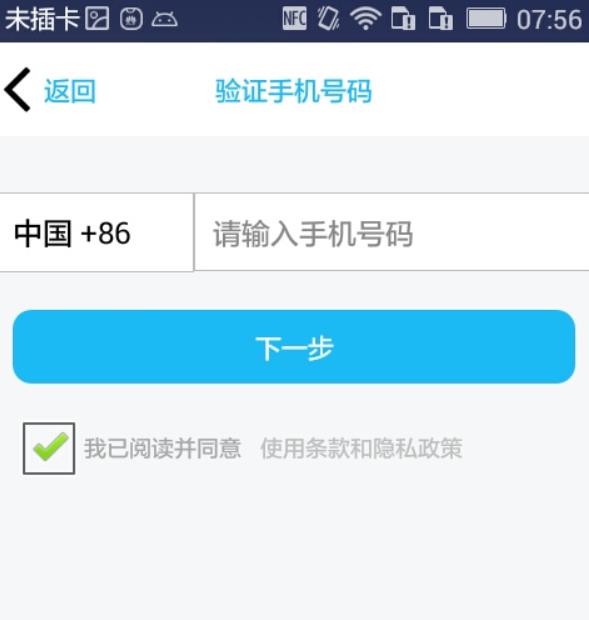
问题:
1、下拉列表(因为还没看到这里...)
2、标题栏显示问题
3、按钮的 Enable 设置
..........
以下是代码:
布局 fragment_main(问题1)
<RelativeLayout xmlns:android="http://schemas.android.com/apk/res/android"
 xmlns:tools="http://schemas.android.com/tools"
 android:layout_width="match_parent"
 android:layout_height="match_parent"
 android:focusable="true"
 android:focusableInTouchMode="true"
 android:background="#F7F7F9"
 tools:context="com.dragon.android.qqregist.MainActivity$PlaceholderFragment" >

 <Button
 android:id="@+id/button2"
 android:layout_width="wrap_content"
 android:layout_height="50dp"
 android:layout_alignParentTop="true"
 android:background="#ffffff"
 android:drawableLeft="@drawable/aa"
 android:text="@string/button2"
 android:textColor="#1CBAF5" />

 <TextView
 android:id="@+id/textView2"
 android:layout_width="match_parent"
 android:layout_height="50dp"
 android:layout_alignBaseline="@+id/button2"
 android:layout_alignBottom="@+id/button2"
 android:background="#ffffff"
 android:gravity="center"
 android:text="@string/pagename"
 android:textColor="#1CBAF5" />

 <LinearLayout
 android:id="@+id/linear"
 android:layout_width="match_parent"
 android:layout_height="wrap_content"
 android:orientation="horizontal"
 android:layout_below="@id/button2"
 android:paddingTop="30dp"
 android:paddingBottom="20dp" >

 <Spinner
 android:id="@+id/spinner1"
 android:layout_width="0dp"
 android:layout_height="wrap_content"
 android:background="@drawable/bg_spinner"
 android:layout_weight="1"
 android:entries="@array/country"/>

 <EditText
 android:id="@+id/editText1"
 android:layout_width="0dp"
 android:layout_height="wrap_content"
 android:layout_weight="2"
 android:background="@drawable/bg_edittext"
 android:ems="10"
 android:inputType="phone"
 android:hint="@string/innum"
 android:color="#000000"
 android:textSize="15sp" >

 </EditText>

 </LinearLayout>

 <Button
 android:id="@+id/button1"
 android:layout_width="match_parent"
 android:layout_height="wrap_content"
 android:layout_marginLeft="10dp"
 android:layout_marginRight="10dp"
 android:layout_below="@id/linear"
 android:enabled="false"
 android:background="@drawable/bg_button"
 android:text="@string/button"
 android:gravity="center"
 android:textColor="#FFFFFF" />

 <CheckBox
 android:id="@+id/checkBox1"
 android:layout_width="wrap_content"
 android:layout_height="wrap_content"
 android:layout_marginTop="10dp"
 android:layout_marginLeft="10dp"
 android:layout_below="@id/button1"
 android:text="@string/sure"
 android:textSize="12sp"
 android:textColor="#A6A6A7" />

 <TextView
 android:id="@+id/textView1"
 android:layout_width="wrap_content"
 android:layout_height="wrap_content"
 android:layout_alignBaseline="@+id/checkBox1"
 android:layout_alignBottom="@+id/checkBox1"
 android:layout_marginLeft="10dp"
 android:layout_toRightOf="@+id/checkBox1"
 android:autoLink="all"
 android:text="@string/protocol"
 android:textSize="12sp" />

</RelativeLayout>
EditText、Spinner 以及 Button 修改前后的背景
1.bg_edittext
<?xml version="1.0" encoding="utf-8"?>
<shape xmlns:android="http://schemas.android.com/apk/res/android" >

 <stroke android:width="1px" android:color="#BEBEBE"/>

 <solid android:color="#FFFFFF" />

 <padding
 android:left="10dp"
 android:top="10dp"
 android:bottom="10dp"/>

</shape>
2.bg_spinner
<?xml version="1.0" encoding="utf-8"?>
<shape xmlns:android="http://schemas.android.com/apk/res/android" >

 <stroke android:width="1px" android:color="#BEBEBE"/>

 <solid android:color="#FFFFFF" />

 <padding
 android:left="10dp"
 android:top="10dp"
 android:bottom="10dp"/>

</shape>
3.bg_button
<?xml version="1.0" encoding="utf-8"?>
<shape xmlns:android="http://schemas.android.com/apk/res/android" >

 <solid android:color="#808080"/>

 <corners android:radius="10dp"/>

 <padding
 android:top="10dp"
 android:bottom="10dp"/>

</shape>
4.bg_buttin_change
<?xml version="1.0" encoding="utf-8"?>
<shape xmlns:android="http://schemas.android.com/apk/res/android" >

 <solid android:color="#1CBAF5"/>

 <corners android:radius="10dp"/>

 <padding
 android:top="10dp"
 android:bottom="10dp"/>

</shape>
Spinner 的下拉数据 arrays
<?xml version="1.0" encoding="utf-8"?>
<resources>
 <string-array name="country">
 <item >中国 +86</item>
 <item >香港 +852</item>
 <item >澳门 +853</item>
 <item >台湾 +886</item>
 <item >日本 +81</item>
 <item >美国 +1</item>
 <item >英国 +44</item>
 </string-array>
</resources>
标题栏的背景(问题2 -- 放弃)
<?xml version="1.0" encoding="utf-8"?>
<resources xmlns:android="http://schemas.android.com/apk/res/android">

 <style name="bg_title" parent="android:Theme">
 <item name="android:windowTitleBackgroundStyle">@style/Titleground</item>
 <item name="android:windowTitleStyle">@style/windowTitleStyle</item>
 <item name="android:windowTitleSize">40dp</item>
 </style>

 <style name="Titleground">
 <item name="android:background">#FFFFFF</item>
 </style>

 <style name="windowTitleStyle">
 <item name="android:text">@string/pagename</item>
 <item name="android:textColor">#1CBAF5</item>
 <item name="android:paddingTop">2dp</item>
 <item name="android:paddingBottom">2dp</item>
 <item name="android:textSize">20sp</item>
 </style>

</resources>
问题2替换方法:隐藏标题栏 -- 在 AndroidManifest 中添加 -- android:theme="@android:style/Theme.NoTitleBar" >
MainActivity (问题3)
package com.dragon.android.qqregist;

import android.annotation.SuppressLint;
import android.app.Activity;
import android.graphics.Color;
import android.os.Bundle;
import android.view.View;
import android.widget.AdapterView;
import android.widget.AdapterView.OnItemSelectedListener;
import android.widget.Button;
import android.widget.CheckBox;
import android.widget.CompoundButton;
import android.widget.CompoundButton.OnCheckedChangeListener;
import android.widget.EditText;
import android.widget.Spinner;
import android.widget.Toast;

public class MainActivity extends Activity {
 private Spinner spinner = null;
 private EditText editText1;
 private Button button2;
 private Button button1;
 private CheckBox checkBox1;

 @Override
 protected void onCreate(Bundle savedInstanceState) {
 super.onCreate(savedInstanceState);
 setContentView(R.layout.fragment_main);

 spinner = (Spinner) findViewById(R.id.spinner1);
 spinner.setSelection(0);
 editText1 = (EditText) findViewById(R.id.editText1);
 editText1.setHintTextColor(Color.GRAY);
 button2 = (Button) findViewById(R.id.button2);
 // 设置空间置顶
 button2.bringToFront();
 button1 = (Button) findViewById(R.id.button1);

 // spinner 选择监听事件
 spinner.setOnItemSelectedListener(new OnItemSelectedListener() {

  @Override
  // parent当前spinner pos/id选中的值所在位置/行
  public void onItemSelected(AdapterView<?> parent, View view,
   int pos, long id) {
  // 得到string-array
  String[] country = getResources().getStringArray(
   R.array.country);
  Toast.makeText(MainActivity.this, "你选择的是:" + country[pos],
   Toast.LENGTH_SHORT).show();
  }

  @Override
  public void onNothingSelected(AdapterView<?> parent) {
  // Another interface callback
  }
 });
 checkBox1 = (CheckBox) findViewById(R.id.checkBox1);
 checkBox1.setOnCheckedChangeListener(new OnCheckedChangeListener() {

  @Override
  @SuppressLint("NewApi")
  public void onCheckedChanged(CompoundButton view, boolean inChecked) {
  button1.setEnabled(inChecked);
  if (!inChecked) {
   // 设置按钮的背景
   button1.setBackground(getResources().getDrawable(
    R.drawable.bg_button));
  } else {
   button1.setBackground(getResources().getDrawable(
    R.drawable.bg_button_change));
  }
  }
 });
 }
}
以上就是本文的全部内容,希望对大家的学习有所帮助,也希望大家多多支持脚本之家。


