

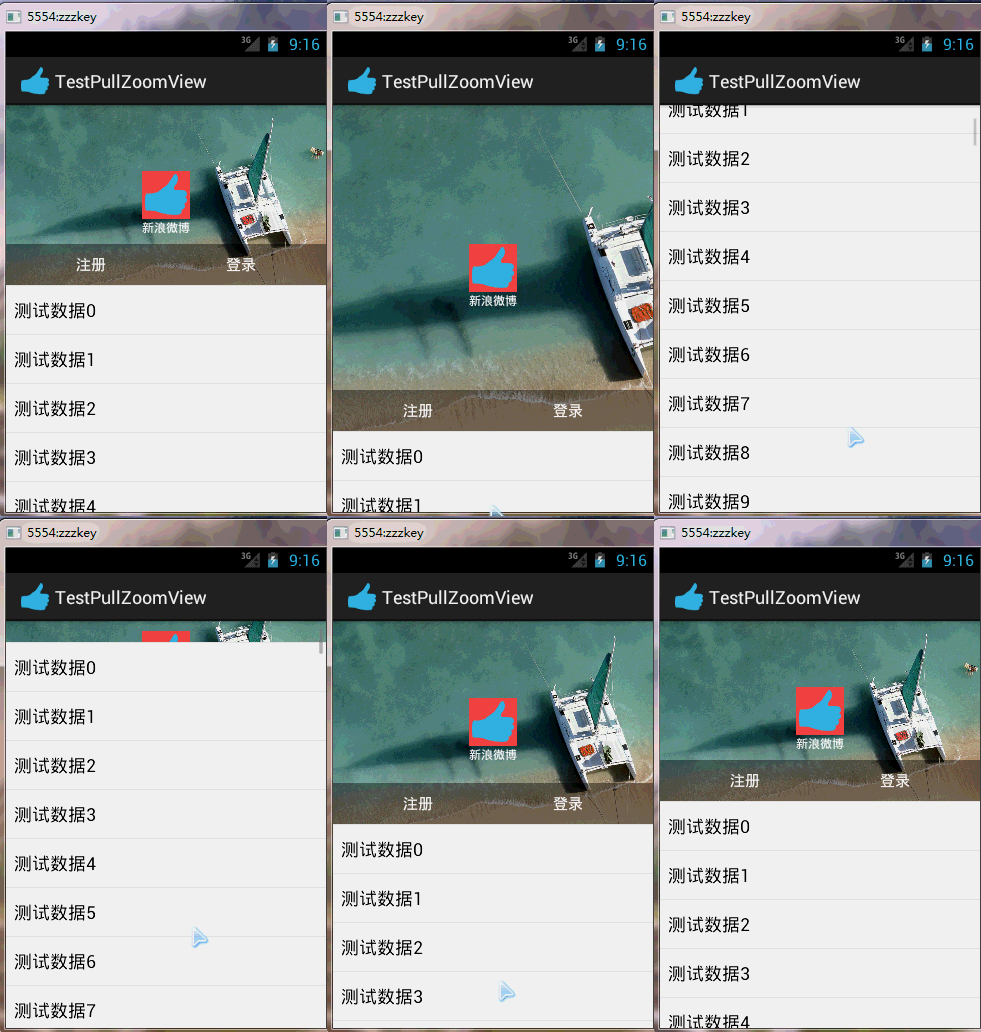
Android PullZoomView是github上面的一个第三方开源项目,该项目实现的功能被新浪微博的移动端广泛使用,其效果就是,当用户在下拉过程中,头部的图片会有一定的拉伸,当用户松开时候,图片又收缩复位,下载地址:https://github.com/Frank-Zhu/PullZoomView
PullZoomView要实现两类,一类是典型的Android ListView,另外一类是Android 的scroll view。本文先介绍PullZoomView在ListView上的实现:PullToZoomListViewEx。
首先需要把PullToZoomListViewEx像ListView一样写进布局:
<RelativeLayout xmlns:android="http://schemas.android.com/apk/res/android"
xmlns:tools="http://schemas.android.com/tools"
android:layout_width="match_parent"
android:layout_height="match_parent"
tools:context="com.zzw.testpullzoomview.MainActivity" >
<com.ecloud.pulltozoomview.PullToZoomListViewEx
xmlns:custom="http://schemas.android.com/apk/res-auto"
android:id="@+id/listView"
android:layout_width="match_parent"
android:layout_height="match_parent"
custom:headerView="@layout/head_view"
custom:zoomView="@layout/head_zoom_view" />
</RelativeLayout>
需要注意的是,需要定义一个headerView:
custom:headerView="@layout/head_view"
<RelativeLayout xmlns:android="http://schemas.android.com/apk/res/android"
android:id="@+id/layout_view"
android:layout_width="match_parent"
android:layout_height="match_parent"
android:layout_gravity="bottom"
android:gravity="bottom">
<ImageView
android:id="@+id/iv_user_head"
android:layout_width="wrap_content"
android:layout_height="wrap_content"
android:layout_centerInParent="true"
android:background="@android:color/holo_red_light"
android:src="@drawable/ic_launcher" />
<TextView
android:id="@+id/tv_user_name"
android:textSize="sp"
android:layout_width="wrap_content"
android:layout_height="wrap_content"
android:layout_below="@id/iv_user_head"
android:layout_centerHorizontal="true"
android:text="新浪微博"
android:textColor="#ffffff" />
<LinearLayout
android:id="@+id/ll_action_button"
android:layout_width="match_parent"
android:layout_height="wrap_content"
android:background="#"
android:layout_alignParentBottom="true"
android:padding="dip">
<TextView
android:id="@+id/tv_register"
android:layout_width="match_parent"
android:layout_height="wrap_content"
android:text="注册"
android:layout_weight=""
android:textSize="sp"
android:gravity="center"
android:layout_gravity="center"
android:textColor="#ffffff" />
<TextView
android:id="@+id/tv_login"
android:layout_width="match_parent"
android:layout_height="wrap_content"
android:text="登录"
android:layout_weight=""
android:textSize="sp"
android:gravity="center"
android:layout_gravity="center"
android:textColor="#ffffff" />
</LinearLayout>
</RelativeLayout>
此处的headerView是位于PullToZoomListViewEx头部的一个子布局,里面定义一些控件将出现在PullToZoomListViewEx的头部,但此处的headerView并不会缩放,只是可以看到此处的headerView在随着下拉过程中移位。
而定义的custom:zoomView:
custom:zoomView="@layout/head_zoom_view"
<?xml version="." encoding="utf-"?>
<ImageView xmlns:android="http://schemas.android.com/apk/res/android"
android:id="@+id/imageView"
android:layout_width="match_parent"
android:layout_height="match_parent"
android:layout_gravity="center_horizontal"
android:scaleType="centerCrop"
android:src="@drawable/a" />
head_zoom_view其实就是简单的放一张图片。
则是真正的要缩放伸展的View,此处通常会放置一张图片,在用户下拉过程中滑动缩放,产生奇妙的视觉效果。
在一定程度上讲,zoomView是衬托在headerView底下的。headerView是一个正常显示的Android View布局,而zoomView则是可以产生动态缩放和收缩效果的特殊zoom View。
写一个完整的例子加以说明。
Java代码:
package com.zzw.testpullzoomview;
import com.ecloud.pulltozoomview.PullToZoomListViewEx;
import android.app.Activity;
import android.os.Bundle;
import android.util.DisplayMetrics;
import android.util.Log;
import android.view.View;
import android.widget.AbsListView;
import android.widget.AdapterView;
import android.widget.AdapterView.OnItemClickListener;
import android.widget.ArrayAdapter;
public class MainActivity extends Activity {
@Override
protected void onCreate(Bundle savedInstanceState) {
super.onCreate(savedInstanceState);
setContentView(R.layout.activity_main);
PullToZoomListViewEx listView = (PullToZoomListViewEx) findViewById(R.id.listView);
String data[] = new String[];
for (int i = ; i < data.length; i++) {
data[i] = "测试数据" + i;
}
listView.setAdapter(new ArrayAdapter<String>(this, android.R.layout.simple_list_item_, data));
listView.getPullRootView().setOnItemClickListener(new OnItemClickListener() {
@Override
public void onItemClick(AdapterView<?> parent, View view, int position, long id) {
Log.d("position", "getPullRootView--->position = " + position);
}
});
listView.setOnItemClickListener(new OnItemClickListener() {
@Override
public void onItemClick(AdapterView<?> parent, View view, int position, long id) {
Log.d("position", "position = " + position);
}
});
setPullToZoomListViewExHeaderLayoutParams(listView);
}
// 设置头部的View的宽高。
private void setPullToZoomListViewExHeaderLayoutParams(PullToZoomListViewEx listView) {
DisplayMetrics localDisplayMetrics = new DisplayMetrics();
getWindowManager().getDefaultDisplay().getMetrics(localDisplayMetrics);
int mScreenHeight = localDisplayMetrics.heightPixels;
int mScreenWidth = localDisplayMetrics.widthPixels;
AbsListView.LayoutParams localObject = new AbsListView.LayoutParams(mScreenWidth,
(int) (.f * (mScreenWidth / .F)));
listView.setHeaderLayoutParams(localObject);
}
}
以上所述是本文关于新浪微博第三方登录界面上下拉伸图片之第三方开源PullToZoomListViewEx(一)的全部叙述,希望大家喜欢,下篇给大家介绍新浪微博第三方登录界面上下拉伸图片之第三方开源PullToZoomListViewEx(二),希望大家继续关注。


