

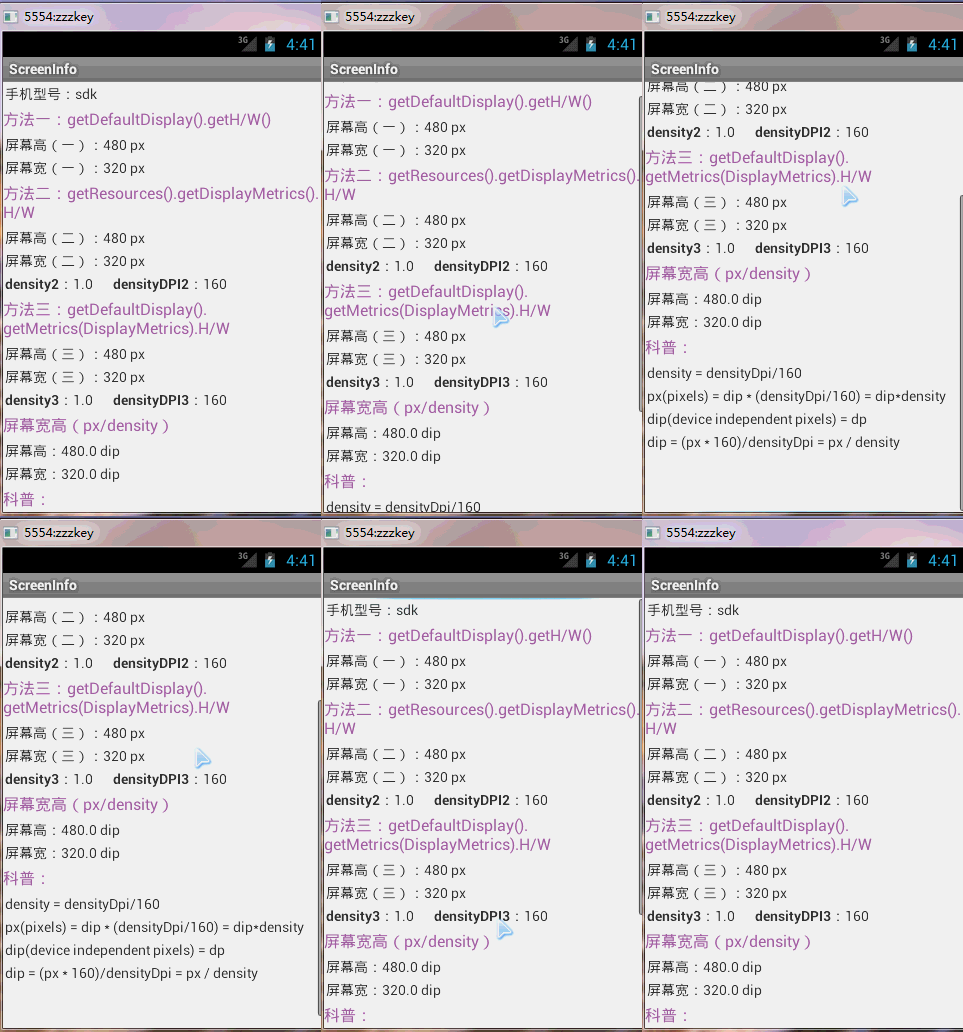
老风格,废话不多说了,直接给大家贴android获取屏幕宽高的代码了。
主要代码:
package com.km.screeninfo;
  import android.os.Bundle;
  import android.support.v.app.Fragment;
  import android.support.v.app.FragmentActivity;
  import android.util.DisplayMetrics;
  import android.view.LayoutInflater;
  import android.view.Menu;
  import android.view.MenuItem;
 import android.view.View;
 import android.view.ViewGroup;
 import android.widget.TextView;
 public class MainActivity extends FragmentActivity {
   @Override
   protected void onCreate(Bundle savedInstanceState) {
     super.onCreate(savedInstanceState);
     setContentView(R.layout.activity_main);
     if (savedInstanceState == null) {
       getSupportFragmentManager().beginTransaction().add(R.id.container, new PlaceholderFragment()).commit();
     }
   }
   /**
    * A placeholder fragment containing a simple view.
    */
   public static class PlaceholderFragment extends Fragment {
     private TextView tvModel;
     private TextView tvScreenHeight;
     private TextView tvScreenHeight;
     private TextView tvScreenHeight;
     private TextView tvScreenWidth;
     private TextView tvScreenWidth;
     private TextView tvScreenWidth;
     private TextView tvScreenDensity;
     private TextView tvScreenDensityDPI;
     private TextView tvScreenDensity;
     private TextView tvScreenDensityDPI;
     private TextView tvScreenWidth;
     private TextView tvScreenHeight;
     public PlaceholderFragment() {
     }
     @Override
     public View onCreateView(LayoutInflater inflater, ViewGroup container, Bundle savedInstanceState) {
       View rootView = inflater.inflate(R.layout.fragment_main, container, false);
       tvModel = (TextView) rootView.findViewById(R.id.tv_model);
       tvScreenHeight = (TextView) rootView.findViewById(R.id.tv_screen_height);
       tvScreenHeight = (TextView) rootView.findViewById(R.id.tv_screen_height);
       tvScreenHeight = (TextView) rootView.findViewById(R.id.tv_screen_height);
       tvScreenHeight = (TextView) rootView.findViewById(R.id.tv_screen_height);
       tvScreenWidth = (TextView) rootView.findViewById(R.id.tv_screen_width);
       tvScreenWidth = (TextView) rootView.findViewById(R.id.tv_screen_width);
       tvScreenWidth = (TextView) rootView.findViewById(R.id.tv_screen_width);
       tvScreenWidth = (TextView) rootView.findViewById(R.id.tv_screen_width);
       tvScreenDensity = (TextView) rootView.findViewById(R.id.tv_screen_density);
       tvScreenDensityDPI = (TextView) rootView.findViewById(R.id.tv_screen_densityDPI);
       tvScreenDensity = (TextView) rootView.findViewById(R.id.tv_screen_density);
       tvScreenDensityDPI = (TextView) rootView.findViewById(R.id.tv_screen_densityDPI);
       tvModel.setText(android.os.Build.MODEL);
       // 获取屏幕密度(方法)
       int screenWidth = getActivity().getWindowManager().getDefaultDisplay().getWidth(); // 屏幕宽(像素,如:px)
       int screenHeight = getActivity().getWindowManager().getDefaultDisplay().getHeight(); // 屏幕高(像素,如:p)
       tvScreenHeight.setText(screenHeight + " px");
       tvScreenWidth.setText(screenWidth + " px");
       // 获取屏幕密度(方法)
       DisplayMetrics dm = getResources().getDisplayMetrics();
       float density = dm.density; // 屏幕密度(像素比例:./././.)
       int densityDPI = dm.densityDpi; // 屏幕密度(每寸像素:///)
       float xdpi = dm.xdpi;
       float ydpi = dm.ydpi;
       int screenWidth = dm.widthPixels; // 屏幕宽(像素,如:px)
       int screenHeight = dm.heightPixels; // 屏幕高(像素,如:px)
       tvScreenHeight.setText(screenHeight + " px");
       tvScreenWidth.setText(screenWidth + " px");
       tvScreenDensity.setText(density + "");
       tvScreenDensityDPI.setText(densityDPI + "");
       // 获取屏幕密度(方法)
       DisplayMetrics dm = new DisplayMetrics();
       getActivity().getWindowManager().getDefaultDisplay().getMetrics(dm);
       density = dm.density; // 屏幕密度(像素比例:./././.)
       densityDPI = dm.densityDpi; // 屏幕密度(每寸像素:///)
       xdpi = dm.xdpi;
       ydpi = dm.ydpi;
       tvScreenDensity.setText(density + "");
       tvScreenDensityDPI.setText(densityDPI + "");
       int screenWidth = dm.widthPixels; // 屏幕宽(px,如:px)
       int screenHeight = dm.heightPixels; // 屏幕高(px,如:px)
       tvScreenHeight.setText(screenHeight + " px");
       tvScreenWidth.setText(screenWidth + " px");
       float screenWidthDip = (dm.widthPixels / density); // 屏幕宽(dip,如:dip)
       float screenHeightDip = (dm.heightPixels / density); // 屏幕宽(dip,如:dip)
       tvScreenHeight.setText(screenHeightDip + " dip");
       tvScreenWidth.setText(screenWidthDip + " dip");
       return rootView;
     }
   }
 }
activity_main.xml:
 <FrameLayout xmlns:android="http://schemas.android.com/apk/res/android"
   xmlns:tools="http://schemas.android.com/tools"
   android:id="@+id/container"
   android:layout_width="match_parent"
   android:layout_height="match_parent"
   tools:context="com.km.screeninfo.MainActivity"
   tools:ignore="MergeRootFrame" />
  <ScrollView xmlns:android="http://schemas.android.com/apk/res/android"
    xmlns:tools="http://schemas.android.com/tools"
    android:layout_width="wrap_content"
    android:layout_height="wrap_content"
    tools:context="com.km.screeninfo.MainActivity$PlaceholderFragment" >
    <LinearLayout
      android:layout_width="match_parent"
      android:layout_height="match_parent"
     android:orientation="vertical" >
     <LinearLayout
       android:layout_width="match_parent"
       android:layout_height="wrap_content"
       android:layout_margin="dip"
       android:orientation="horizontal" >
       <TextView
         android:layout_width="wrap_content"
         android:layout_height="wrap_content"
         android:text="手机型号:"
         android:textStyle="bold" />
       <TextView
         android:id="@+id/tv_model"
         android:layout_width="wrap_content"
         android:layout_height="wrap_content" />
     </LinearLayout>
     <TextView
       android:layout_width="wrap_content"
       android:layout_height="wrap_content"
       android:layout_marginBottom="dip"
       android:layout_marginTop="dip"
       android:text="方法一:getDefaultDisplay().getH/W()"
       android:textColor="#aaaa"
       android:textSize="sp" />
     <LinearLayout
       android:layout_width="match_parent"
       android:layout_height="wrap_content"
       android:layout_margin="dip"
       android:layout_marginTop="dip"
       android:orientation="horizontal" >
       <TextView
         android:layout_width="wrap_content"
         android:layout_height="wrap_content"
         android:text="屏幕高(一):"
         android:textStyle="bold" />
       <TextView
         android:id="@+id/tv_screen_height"
         android:layout_width="wrap_content"
         android:layout_height="wrap_content" />
     </LinearLayout>
     <LinearLayout
       android:layout_width="match_parent"
       android:layout_height="wrap_content"
       android:layout_margin="dip"
       android:orientation="horizontal" >
       <TextView
         android:layout_width="wrap_content"
         android:layout_height="wrap_content"
         android:text="屏幕宽(一):"
         android:textStyle="bold" />
       <TextView
         android:id="@+id/tv_screen_width"
         android:layout_width="wrap_content"
         android:layout_height="wrap_content" />
     </LinearLayout>
     <TextView
       android:layout_width="wrap_content"
       android:layout_height="wrap_content"
       android:layout_marginBottom="dip"
       android:layout_marginTop="dip"
       android:text="方法二:getResources().getDisplayMetrics().H/W"
       android:textColor="#aaaa"
       android:textSize="sp" />
     <LinearLayout
       android:layout_width="match_parent"
       android:layout_height="wrap_content"
       android:layout_margin="dip"
       android:layout_marginTop="dip"
       android:orientation="horizontal" >
       <TextView
         android:layout_width="wrap_content"
         android:layout_height="wrap_content"
         android:text="屏幕高(二):"
         android:textStyle="bold" />
       <TextView
         android:id="@+id/tv_screen_height"
         android:layout_width="wrap_content"
         android:layout_height="wrap_content" />
     </LinearLayout>
     <LinearLayout
       android:layout_width="match_parent"
       android:layout_height="wrap_content"
       android:layout_margin="dip"
       android:orientation="horizontal" >
       <TextView
         android:layout_width="wrap_content"
         android:layout_height="wrap_content"
         android:text="屏幕宽(二):"
         android:textStyle="bold" />
       <TextView
         android:id="@+id/tv_screen_width"
         android:layout_width="wrap_content"
         android:layout_height="wrap_content" />
     </LinearLayout>
     <LinearLayout
       android:layout_width="match_parent"
       android:layout_height="wrap_content"
       android:layout_margin="dip"
       android:layout_marginTop="dip"
       android:orientation="horizontal" >
       <TextView
         android:layout_width="wrap_content"
         android:layout_height="wrap_content"
         android:text="density:"
         android:textStyle="bold" />
       <TextView
         android:id="@+id/tv_screen_density"
         android:layout_width="wrap_content"
         android:layout_height="wrap_content" />
       <TextView
         android:layout_width="wrap_content"
         android:layout_height="wrap_content"
         android:layout_marginLeft="dip"
         android:text="densityDPI:"
         android:textStyle="bold" />
       <TextView
         android:id="@+id/tv_screen_densityDPI"
         android:layout_width="wrap_content"
         android:layout_height="wrap_content" />
     </LinearLayout>
     <TextView
       android:layout_width="wrap_content"
       android:layout_height="wrap_content"
       android:layout_marginBottom="dip"
       android:layout_marginTop="dip"
       android:text="方法三:getDefaultDisplay().getMetrics(DisplayMetrics).H/W"
       android:textColor="#aaaa"
       android:textSize="sp" />
     <LinearLayout
       android:layout_width="match_parent"
       android:layout_height="wrap_content"
       android:layout_margin="dip"
       android:layout_marginTop="dip"
       android:orientation="horizontal" >
       <TextView
         android:layout_width="wrap_content"
         android:layout_height="wrap_content"
         android:text="屏幕高(三):"
         android:textStyle="bold" />
       <TextView
         android:id="@+id/tv_screen_height"
         android:layout_width="wrap_content"
         android:layout_height="wrap_content" />
     </LinearLayout>
     <LinearLayout
       android:layout_width="match_parent"
       android:layout_height="wrap_content"
       android:layout_margin="dip"
       android:orientation="horizontal" >
       <TextView
         android:layout_width="wrap_content"
         android:layout_height="wrap_content"
         android:text="屏幕宽(三):"
         android:textStyle="bold" />
       <TextView
         android:id="@+id/tv_screen_width"
         android:layout_width="wrap_content"
         android:layout_height="wrap_content" />
     </LinearLayout>
     <LinearLayout
       android:layout_width="match_parent"
       android:layout_height="wrap_content"
       android:layout_margin="dip"
       android:layout_marginTop="dip"
       android:orientation="horizontal" >
       <TextView
         android:layout_width="wrap_content"
         android:layout_height="wrap_content"
         android:text="density:"
         android:textStyle="bold" />
       <TextView
         android:id="@+id/tv_screen_density"
         android:layout_width="wrap_content"
         android:layout_height="wrap_content" />
       <TextView
         android:layout_width="wrap_content"
         android:layout_height="wrap_content"
         android:layout_marginLeft="dip"
         android:text="densityDPI:"
         android:textStyle="bold" />
       <TextView
         android:id="@+id/tv_screen_densityDPI"
         android:layout_width="wrap_content"
         android:layout_height="wrap_content" />
     </LinearLayout>
     <TextView
       android:layout_width="wrap_content"
       android:layout_height="wrap_content"
       android:layout_marginBottom="dip"
       android:layout_marginTop="dip"
       android:text="屏幕宽高(px/density)"
       android:textColor="#aaaa"
       android:textSize="sp" />
     <LinearLayout
       android:layout_width="match_parent"
       android:layout_height="wrap_content"
       android:layout_margin="dip"
       android:layout_marginTop="dip"
       android:orientation="horizontal" >
       <TextView
         android:layout_width="wrap_content"
         android:layout_height="wrap_content"
         android:text="屏幕高:"
         android:textStyle="bold" />
       <TextView
         android:id="@+id/tv_screen_height"
         android:layout_width="wrap_content"
         android:layout_height="wrap_content" />
     </LinearLayout>
     <LinearLayout
       android:layout_width="match_parent"
       android:layout_height="wrap_content"
       android:layout_margin="dip"
       android:orientation="horizontal" >
       <TextView
         android:layout_width="wrap_content"
         android:layout_height="wrap_content"
         android:text="屏幕宽:"
         android:textStyle="bold" />
       <TextView
         android:id="@+id/tv_screen_width"
         android:layout_width="wrap_content"
         android:layout_height="wrap_content" />
     </LinearLayout>
     <TextView
       android:layout_width="wrap_content"
       android:layout_height="wrap_content"
       android:layout_marginBottom="dip"
       android:layout_marginTop="dip"
       android:text="科普:"
       android:textColor="#aaaa"
       android:textSize="sp" />
     <TextView
       android:layout_width="wrap_content"
       android:layout_height="wrap_content"
       android:layout_margin="dip"
       android:text="density = densityDpi/" />
     <TextView
       android:layout_width="wrap_content"
       android:layout_height="wrap_content"
       android:layout_margin="dip"
       android:text="px(pixels) = dip * (densityDpi/) = dip*density" />
     <TextView
       android:layout_width="wrap_content"
       android:layout_height="wrap_content"
       android:layout_margin="dip"
       android:text="dip(device independent pixels) = dp " />
     <TextView
       android:layout_width="wrap_content"
       android:layout_margin="dip"
       android:layout_height="wrap_content"
       android:text="dip = (px * )/densityDpi = px / density" />
     <TextView
       android:layout_width="wrap_content"
       android:layout_height="wrap_content"
       android:layout_margin="dip" />
   </LinearLayout>
 </ScrollView>
ps:在 Activity 中获得屏幕的宽和高
 int srceenW = this.getWindowManager().getDefaultDisplay().getWidth();
 int screenH = this.getWindowManager().getDefaultDisplay().getHeight();
如果需要适应不同分辨率的屏幕,则按照以下方式操作:
准备多套不同的图片:
分别放hdpi、mdpi、ldp文件夹中;
摆放控件的时候要得到屏幕宽高度,然后在程序中设定控件的百分乘屏幕的宽和高。


